We will release the latest Snapmaker J1 firmware updates and downloads under this topic. Your feedback is very much appreciated. You can report any bugs or make any suggestions in the discussion thread.
Added 0.01 mm step Z Offset option in Print Adjustment
Added Print Again Option when Touchscreen print job completed(excepted Calibration Check or Vibration Compensation Calibration)
Added Hot End PID Auto Tune settings
You can re-calibrate hot end PID params in Settings > Attendance > Hot End PID Auto Tune
Bug Fixes
Fixed a bug that Screensaver showed incorrect print time in Offset Calibration Check
Fixed a bug that Touchscreen showed error dialog unexpectedly when print job stopped in Offset Calibration Check
Fixed a bug that Touchscreen showed incorrect lighting level in Adjustment > Lighting
Improvements
Optimized Touchscreen processing for file transfer and upgrade when local storage is insufficient
Notice: When local storage is insufficient, Touchscreen will clean up local files for free up enough space(according to the file created time locally, from earliest to latest)
Mainboard
New Features
Added Hot End PID Auto Tune supported
Supported different PID params between two hotends
Bug Fixes
Fixed a bug that Power Loss Recovery failed when filament status had already ran out before recovered
Fixed a bug that Z Offset Calibration always failed in some scenario
Fixed a bug that the print job could not resume when Snapmaker Luban connected in some scenario
Improvements
Optimized XY Offset Calibration with different hotends compatibility
Fixed vibration compensation calibration X/Y result check problem
Values selected from touchscreen during the Vibration Compensation Calibration are now utilized correctly. Selecting an incorrect value will negatively effect print quality.
Mainboard
New Features
Added new error code for hotend detection abnormal
Bug Fixes
Fixed a bug that firmware would not start up when system was exceptional in some scenario
Improvements
Optimized UX of filament run out detection in print job
Added more distance of filament run out sensor detection in order to reduce false alert of filament run out warning
Added parameter check of vibration compensation calibration
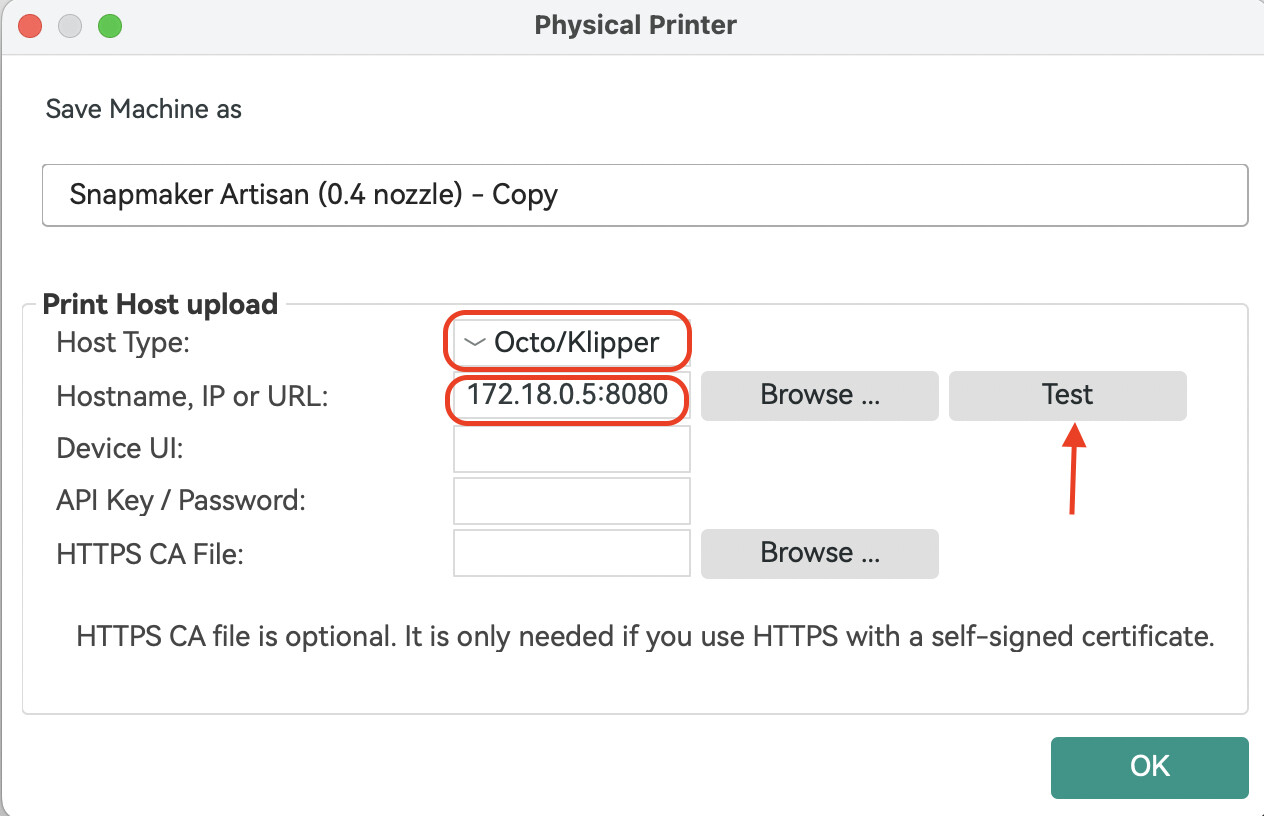
Added Direct Machine Connection support for Snapmaker Orca. You can now send G-code to your machine over Wi-Fi without using Luban as a transfer station. Snapmaker Orca communicates directly with your machine through the OctoPrint protocol.
With the beta firmware you no longer need to open Snapmaker Luban first to establish the connection. The only difference from before is the IP-address format, which now becomes: current device IP:8080 , e.g., 192.168.0.1:8080 .
Uploading and starting a print from both Snapmaker Luban and Snapmaker Orca at the same time will cause the job to fail.
In some cases, sending a file via Snapmaker Orca may stick at 0 % upload progress; if this happens, restart the machine and provide logs plus a description of the problem.
**Added support for direct network connection between the machine and Snapmaker Orca.**You can now send G-code to your machine over Wi-Fi without using Luban as a transfer station. Snapmaker Orca communicates directly with your machine through the OctoPrint protocol.
With the firmware you no longer need to launch Snapmaker Luban first to establish the connection. The only difference from before is the IP-address format, which now becomes: current device IP :8080 , e.g., 192.168.0.1:8080.
For step-by-step instructions, please click here to view the related Wiki article.
Known issues
Uploading and starting a print from both Snapmaker Luban and Snapmaker Orca at the same time will cause the job to fail.
In some cases, sending a file via Snapmaker Orca may stick at 0 % upload progress; if this happens, restart the machine and provide logs plus a description of the problem.