This version is a beta for J1/J1S, you can download and test it. If you encounter any issues, please leave feedback below so we can iterate quickly. The official machine firmware will be released before 2026-1-31.
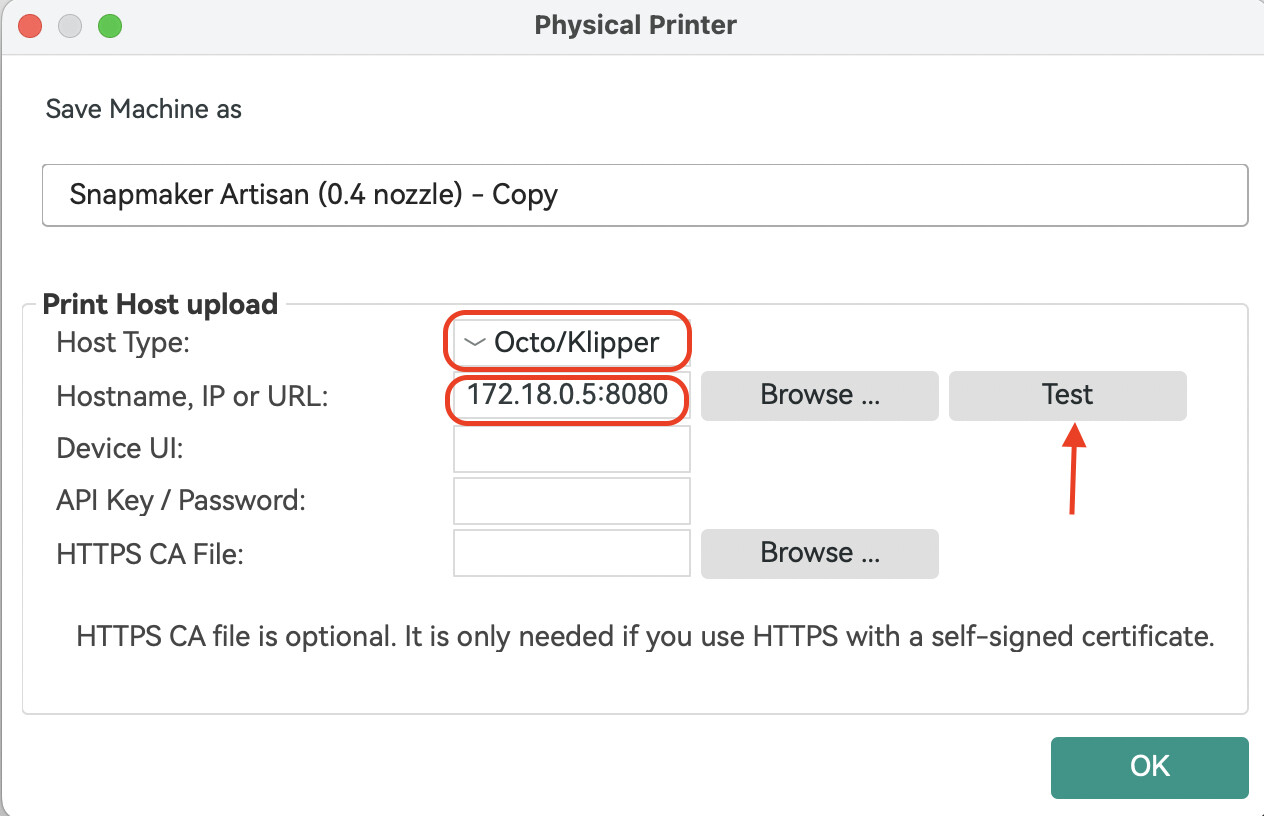
Added Direct Machine Connection support for Snapmaker Orca. You can now send G-code to your machine over Wi-Fi without using Luban as a transfer station. Snapmaker Orca communicates directly with your machine through the OctoPrint protocol.
With the beta firmware you no longer need to open Snapmaker Luban first to establish the connection. The only difference from before is the IP-address format, which now becomes: current device IP:8080 , e.g., 192.168.0.1:8080 .
Uploading and starting a print from both Snapmaker Luban and Snapmaker Orca at the same time will cause the job to fail.
In some cases, sending a file via Snapmaker Orca may stick at 0 % upload progress; if this happens, restart the machine and provide logs plus a description of the problem.
We’re collecting the issues you’ve encountered when using this beta version. Post in This Thread: Feel free to discuss any issues or feedback here.
Awesome - i really like my modded j1 but connection wise it was a disaster and luban was not really up to my needs. You not supporting it really put me off buying a U1 but now I think I will order that as a complement.
(note the J1 estimated time doesn’t match the estimate displayed in Snamaker Orca)
Nonetheless, Thank you for continuing to support a really awesome printer!
I’ve run 7 back to back prints so far and the printer hasn’t stalled on me or had any issues that I was experiencing while using SEND & PRINT on Orca through Luban.
Normally I used to get stalled printer in between the 2nd and 4th print job (where it gets ready to print then homes back down and sits like that with no progression or failure notifications and even exexcuting the file again from Orca or from the screen would do the same thing or just become unresponsive and only a printer restart would resolve the issue)
I am fairly confident that the new Orca connection to the J1S seems to be working as it should.
I will continue to test the connection out and report back if I see anything but for now it’s looking very promising.
The file name seems to be consistent with what was sent via Orca and Thumbnails missing but I don’t see the use of thumbnail when you name a file properly enough to identify it. Thumbnails are usually too small to see that job and sometimes 2 thumbnails look alike although the file may be slightly different so as far as Thumbnails are concerned (to me) I don’t see that being much of an issue.
Now only if SNAPMAKER could add a feature that we could hit a STOP or PAUSE button from the PC that would change everything. Not sure how and if that can be implemented but it would be nice.
Would be great if the development team could review/include the changes described in the post below to enable Octoprint. The lack of real remote control features is a pain with this printer.
Thank you to the Snapmaker team for the new beta firmware!
I’ve completed a series of initial print tests, and the firmware is running stably on my J1. I did not encounter any new critical bugs beyond those already reported by other testers in this thread.
Feature Requests for Future Consideration:
Thumbnail Support: The ability to view a preview image of the model directly on the touchscreen when selecting a print file, similar to functionality in other mainstream firmware.
Cached print: start printing immediately without first being saved to the internal storage.
Web Interface (Port 8080) Enhancement Suggestions:
The web interface is a fantastic tool for remote monitoring. The following additions would make it even more powerful:
Enhanced Physical Control: The addition of dedicated Start, Stop, and Pause buttons.
Print Progress: A clear, numeric percentage indicator (0-100%).
Time Remaining: An estimate of print time left (dynamic, updated as the print progresses).
Real-time Temperature Data: Display of the current and target temperatures for both the heated bed and each nozzle (Toolhead A & B).
These additions would provide a complete at-a-glance status check without needing to be at the printer console.
Keep up the great work! I’ll continue stress-testing and will report back if I discover anything new.
Simon,
As this is feeling like it might be the LAST firmware update - we really are looking for J1 to “complete” things in this release:
The thumbnail should work for transferred gcode files.
The current layer and total amount of layers should be displayed on the LCD screen (as was done on the U1).
Some telemetry on the web-page for the J1 would be useful (even if just a copy of what is being displayed on the front LCD). Including a STOP button so the machine can be stopped remotely via the web interface.
Thanks for taking the time to do this update.
first: very nice job. It works as expected, print jobs are delivered to the printer. Anyway, I have just some suggestions for developers:
I understand that print server inside the printer need a lot of work and (based on ma U1 experience) I am sure that developers know what to do, but like following features:
possibility for stream from external webcam,
remain time + % of print job,
actual layer number and total layers (as on U1),
basic control of printer (as on U1
if this is the only webserver on printer, please consider to use port 80 instead of 8080
sent information to email about significant printing issues (no filament, finishing job, etc.)
some graphs with temperatures (extruders, heatbed…)
@Simon_Zhi also agree with the previous request for them review and consider the changes in @DLMCW 's modified firmware to enable Octoprint more fully.
OP was never fully supported, and was a kind of abandoned commitment from the original campaign due to resource and time constraints. But it would be very useful still.
Right now, iterating and optimizing the U1 software and firmware is the top priority; until the slicer and machine firmware are stable and user-friendly, they can’t shift their focus elsewhere.
Thanks for the direct Wi-Fi printing feature, it’s really convenient and a big improvement
It might just be a coincidence, but since updating both Snapmaker Orca and this beta firmware I’ve started noticing some unexpected behavior that wasn’t present before the updates.
I’ll soon double-check belt tension and the rest of the mechanics, but at the moment everything looks fine from a hardware standpoint.