Hi everyone,
I’m seeing some unsightly grooves in the print.
What can I do about it?


Hi, how about some pictures from the front? Can you also share the .3mf files?
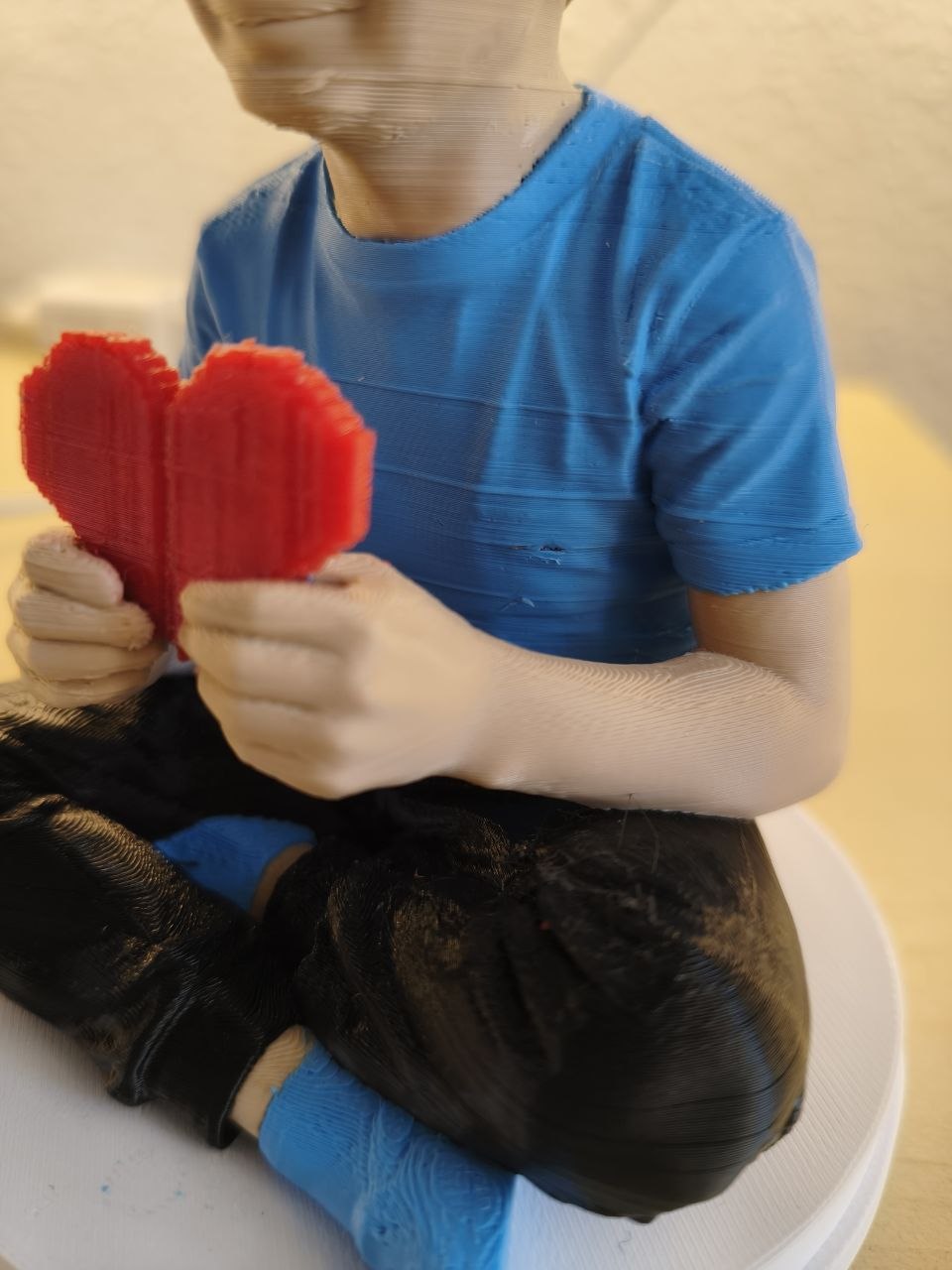
These are layer shifts. Make sure all your belt tensions are set up correctly, and things like that.
Has there been a long pause during printing that was later resumed?
If so, “cooling shrinkage” is likely the “culprit.” During the interruption, the internal sparse infill (such as the Gyroid structure) cooled and contracted first, literally “pulling” the outer walls of the model inward, creating a concave groove.
Hmm, that actually makes sense. There were indeed two pauses, but they weren’t at the largest grooves, and besides, there are still many smaller grooves.
I did a test print and added extra-long pauses (<15 min) with the lower pressure (the higher pressure one had no pause).
The pauses are visible, but not nearly as bad.
I should probably try printing the figure in one color and without a pause.
Let’s see what comes out of it.

I’ve now printed the figure two more times: once with the two pauses and once completely without any pauses.
I can’t see any difference, and the grooves are gone.
So it must be related to the color change. Could it be possible that the printer isn’t properly engaging one of the print heads? Is there any way I can check this?

