I recently received my own SM 2.0, and have several projects in mind. One of them is similar to that string art kind of thing where you weave string around nails set into the perimeter of the pattern. Is there a mode or setting to make the CNC drill holes along the path its on.
Ex. I have an image of the map of a state, and I want it to drill a small pilot hole every inch along the outline.
Thanks!
As far as I know, there isn’t any preset “mode” to so this, but through a bit of effort in fusion360 you should be able to get that result by manually placing the holes to be drilled.
Shoot. That’s what I was hoping to avoid. Thanks
You can do “repeat pattern along path” for features in fusion 360, just make one hole of the correct diameter, draw the path you want, extrude (cut) the circle, then do “repeat feature on path” to drag copies of the hole through a body.
Oh, cool. I will look into that. Thanks!
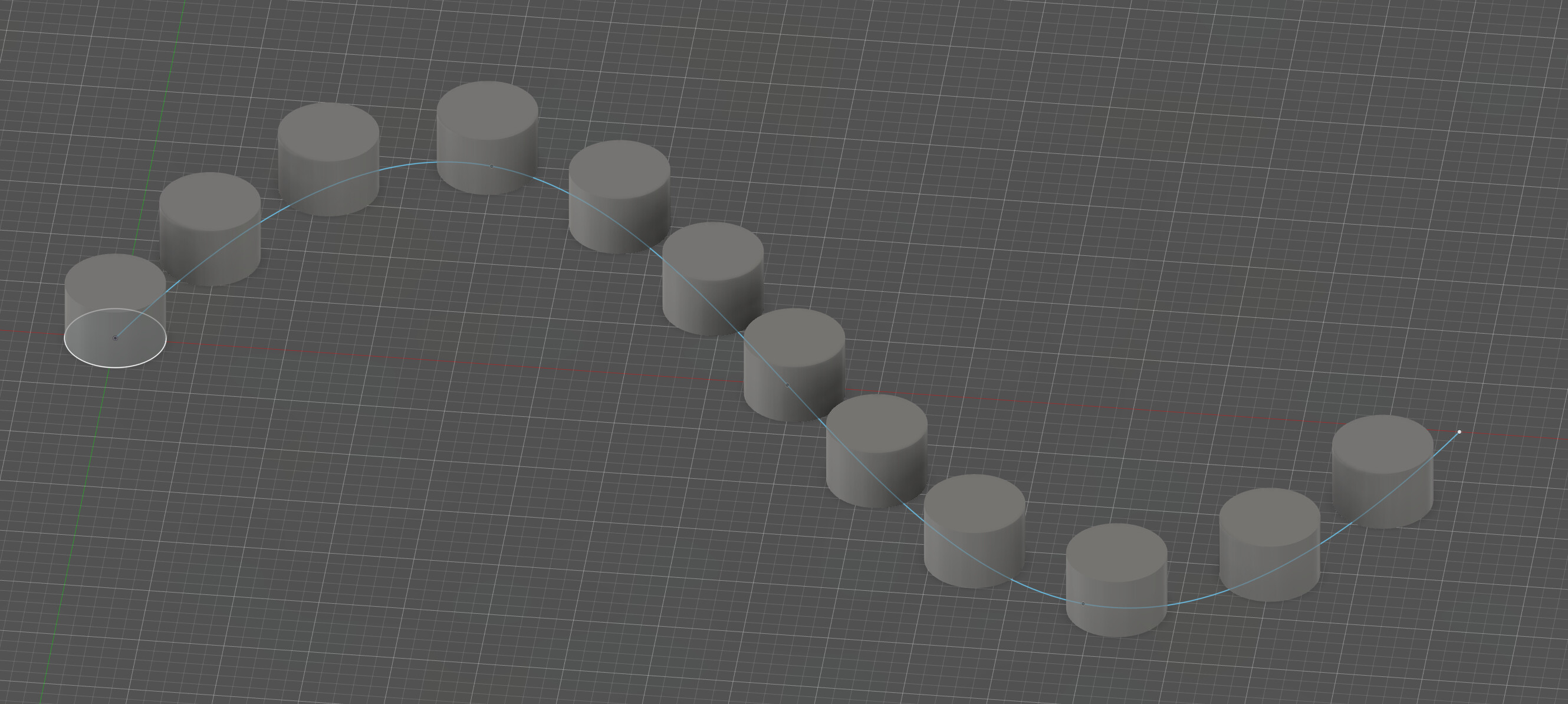
Here are 12 three-millimeter cylinders at a five-millimeter spacing along a spline as an example of what @nivekmai suggested. I created a sketch, added the spline, then placed a center-diameter circle at the start point of the spline. Then I finished sketch and extruded the cylinder. After making the sketch visible again, from create, pattern > pattern on path, select the face (or body), then the path from the sketch. Distance can be a total distance (e.g., x number over x distance) or spaced as in my example.
3 Likes
I think that is pretty much exactly what I need. Thanks!