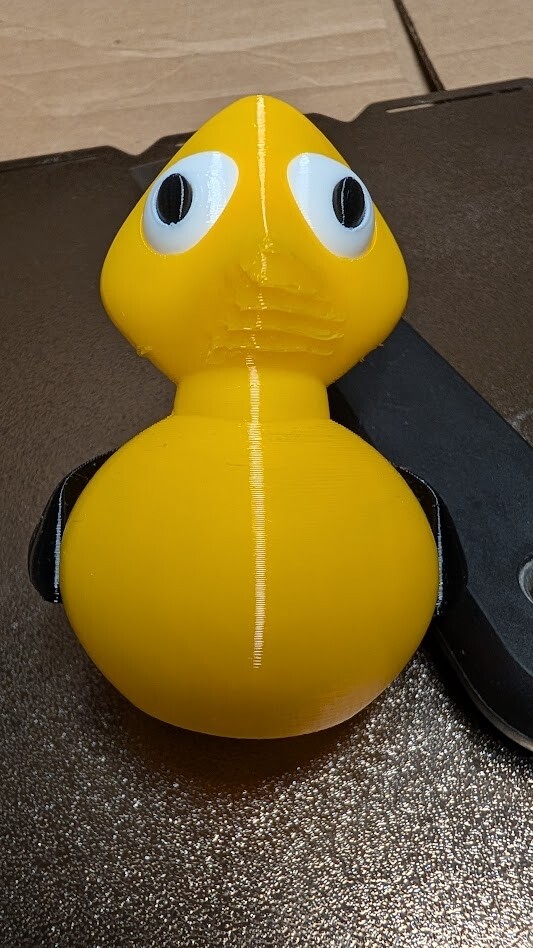
My Ducky in TPU. Any thoughts on the anomalies I’m getting? It’s been a long time since I printed TPU, first on the U1, so I’m not all that familiar with it but the left side is clearly cleaner than the right; although it has issues too.
Under the wings, no Supports
Bottom left is beautiful / bottom right is ugly
Under the chin area without Supports
Defects run slightly to left of center to very drastic right of center
Almost cut like “gouges”
On both sides and possibly from the Support structure?
I am ecstatic about the Supports how easy they were to remove! I ran a test for both top and bottom removal and for me 0.21 is darn near perfect. Also, look at how clean my “signature” is
Looks to me like a lot of sagging due to TPU needing a higher angle set for when support is required (sorry, not got into Orca yet and not sure of the terminology). TPU also needs maximum cooling to stop it staying soft too long.
Something else which might help is outer shell print order. You can set that to outside in or inside out. Outside in provides best dimension control and first layer bed adhesion, but inside out is best for overhangs.
Inside out vs outside in makes sense. I’ll also do some manual Support painting.
Thing that I didn’t understand is the bottom left is perfect without supports but the bottom right is bad. Same exact shape and “overhang” so I feel like the bed is off on the right side… if that’s a thing. I’ll do a manual bed level from the control panel on the U1 and see if that helps.
I can say much about U1 but on F350 Dual sometimes you need to arrange model in a way that cooling fan blowing on part that express getting less cooling than needed.
You probably mean the auxiliary fan. This one is located on the left side of the print chamber. It should only be used with caution. Best to set it to 0 for TPU in the print profile. This prevents incorrect cooling air from the left side >>> best to test it out.
Where did you get the information that TPU should be printed with maximum cooling? Usually, TPU is printed with a low fan speed of 10–30%. This is something you have to try out. But I have never used 100% fan speed!!!
If sagging occurs, the solution is to print slowly and possibly increase the fan speed only slightly. That’s my experience.