I’ve had my U1 for a few days now and am using it together with an X1C and A1 Mini.
I mostly use BambuLab filaments and am currently wondering how I can get the BambuLab filament profiles into Snapmaker Orca. When I export from BambuStudio, it only offers me the profiles I’ve modified. However, I’d like to import the system profiles (e.g., PLA Basic).
When I open a .3mf file created with BambuStudio in SM Orca, the profiles stored within are generally imported, but the temperature profiles don’t match (and possibly other settings as well).
Then go back to the filament settings, then to Custom Filaments and Create New!
Create a new filament profile for the Snapmaker U1 based on the profile you added in the previous step. Bambu is not listed as a manufacturer and cannot be written, so I chose BamLab. The serial number MUST be filled in, otherwise an error message will appear.
Each filament must be created anew. It’s quick, though. After that, the custom profiles can be exported. The profiles can then be imported into SnOrca.
Thank you very much. I of course also have Orca, albeit a slightly older version. After Bambu “closed” the firmware, I switched to Bambu Studio.
I just updated Orca to the latest version (2.3.1), and there I can also set up the U1—I can access the interface via the Klipper interface.
There, I can select all kinds of filaments (including my BambuLab types).
Why not just stick with Orca Slicer? Must I necessarily use Snapmaker Orca?
Sorry for all the questions, but I haven’t followed Orca’s development anymore, even though I’d prefer it over Bambu Studio. However, the “detour” via Developer Mode isn’t for me, so I switched nearly a year ago.
Okay, that makes sense, especially with a new printer that is still “in development”—there must be a reason why the manufacturer decided to go with their own version (here: to respond more quickly to errors and requests).
So, it makes sense for now.
But in the “Klipper view,” there’s quite a lot to see!! Do I now have to learn Klipper at over 65? (not entirely serious)
for others that may be considering or have come to the U1 from bambu here is something I found, obviously haven’t use it yet as I do not as of yet have the U1
Hello again, that’s exactly how I did it now and it worked well.
The filament management in the various Orca clones (including Orca itself) is quite a science on its own!! I understand that you want a separate profile for each printer and each nozzle diameter. But then you should be able to easily port it to a new printer without getting frustrated. My profiles from, for example, Extrudr, whose filament I use most besides Bambu, I could only get to work on the Snapmaker by manually entering them into the .json under “compatible printers”. All other known variants didn’t work.
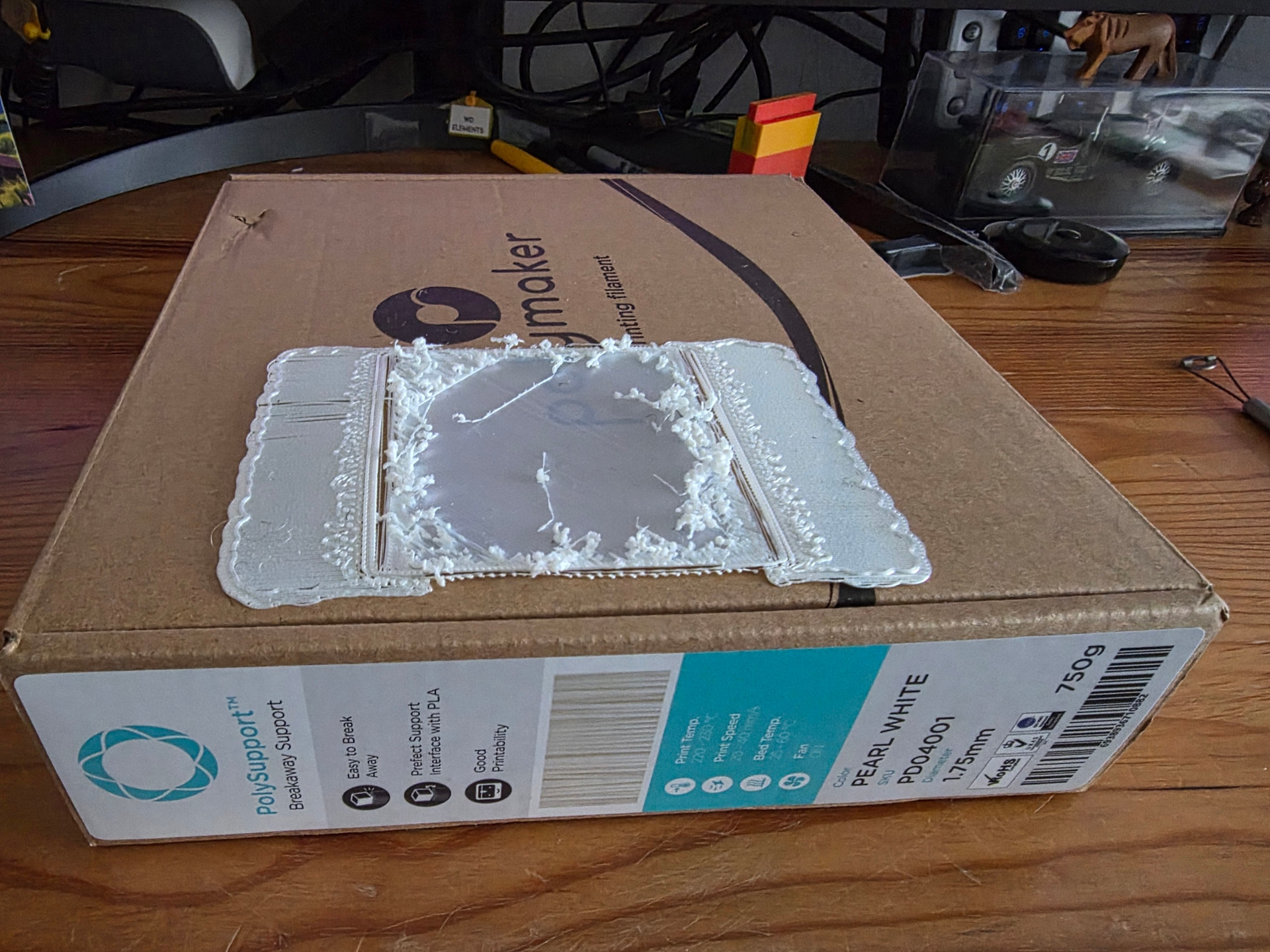
Can anybody help me as I’m trying use Polymaker PolySupport breakaway support for PLA because Snapspeed support filament for PLA is sold out for UK on the Snapmaker Global site having spoken to support.
As you can see in the image the issue comes after the first layer where I think at the nozzle is crushing into print layer because it seems to push it off. I created a custom custom filament Profile using the settings from the Polymaker
website With the aid of Google AI But it would be nice if I could import them directly from Orca Slicer Software But lo and behold there is no Polly maker filaments for PLA in the standard filaments to be able to transfer using your method, do you think you could help me with this issue in the image Or create a custom profile?