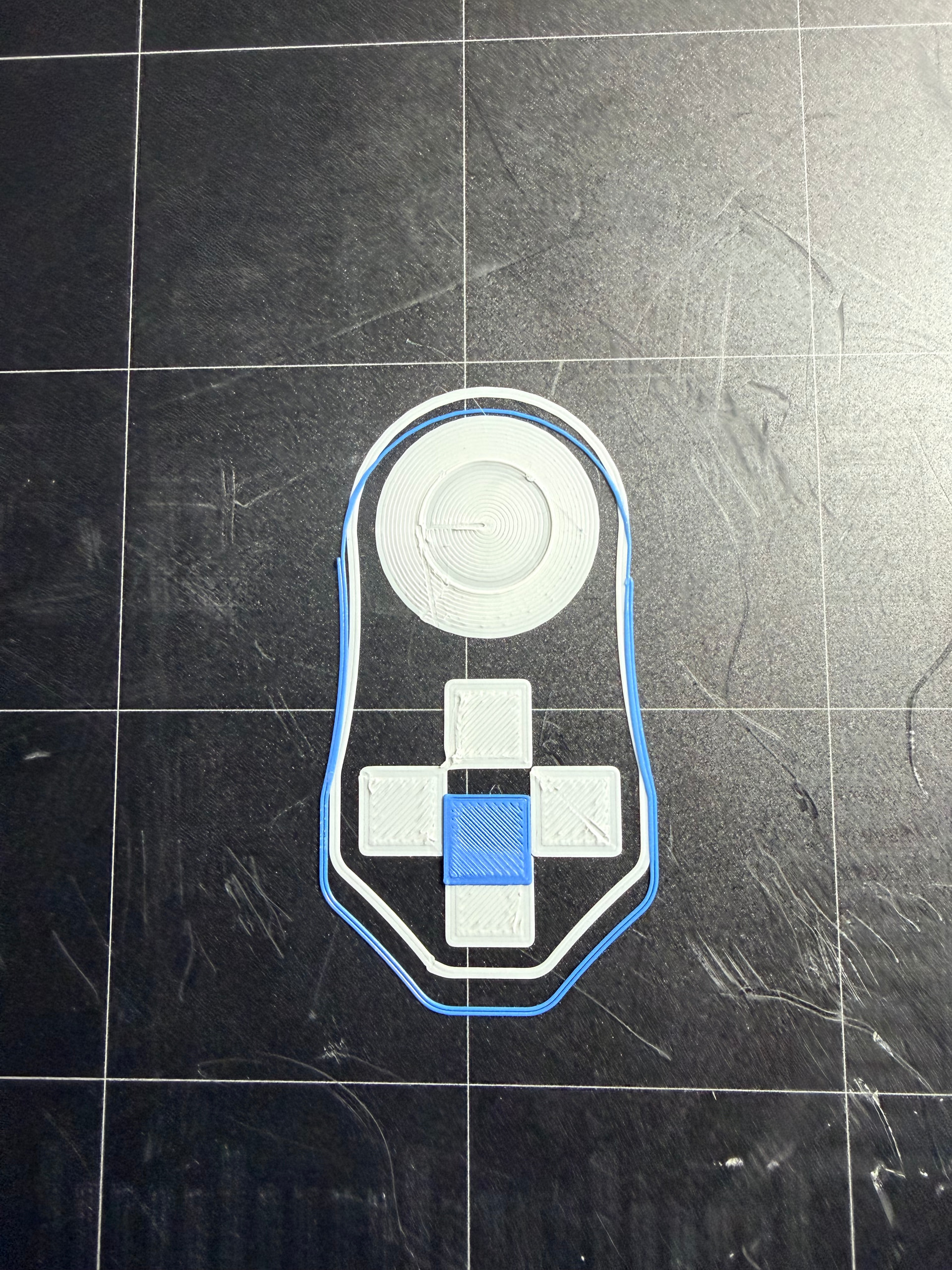
I just received a new dual extruder module and I can’t seem to get the calibration right. The issue seems to be with the XY calibration. The X axis seems fine but the Y axis is just off, as can be seen in the attached picture. Could this be a bad module?
So much offset cant be a bad head. To much offset for a hardware problem I think. Try to reset your Maschine to factory defaults (Open luban, Switch to workbench, connect to machine and send M502 and M500, restart maschine). And check for newest firmware version and try again.
I tried your suggestions of doing the M502 and M500 codes. I turned off the printer and turned back on. It all seemed the same. No factory reset. I was expecting to have to put in my wireless network and go through the whole setup like I did out of the box.
However, I did try running an XY Calibration and the print doesn’t even work. I attached a picture of the XY Calibration and you can notice that on the Y axis, the blue color didn’t even print on the white at the very top. It’s off by a lot.
Any other suggestions?
I just read somewhere else that to do a factory reset, you can’t do it through the Luban app over the network. You have to connect your laptop and do the M502 and M500 commands.