U1 Top-Cover Mod (ING)

Project Introduction:

  • I’m an early-bird U1 owner and didn’t buy the top cover—so I’m going to design my own with acrylic and printed parts. Hoping to come up with something fun.

(a.k.a. filling the hole)

You are Snapmaker staff?

Yes. I guess I think I indirectly hinted at it to him with my post [ https://forum.snapmaker.com/t/ral-color-of-the-u1-housing/40349/2 ]

Nice to see that even staff members are makers :innocent:

Btw.: I ordered a top cover but it will be delivered march next year. I`ve searched for an alternative

1 Like

I would add this post to this comparison:

https://makerworld.com/de/models/2022565-snapmaker-u1-top-hat-by-srin?from=search#profileId-2180097

1 Like

Because I’m now a U1 owner, I’ll be helping to moderate the forum—I only joined less than two weeks ago.

Quick update on where my head’s at:

  1. What material should I use for the printed parts?

  2. Besides acrylic, are there any other options for the clear cover?

  3. Which standard screw size can cover everything—ideally just one?

  4. The official dome is pretty tall; any tricks to cut down on material?

Don’t forget to add a spot for LED lights! :wink:

OK!I will take the LED into consideration!

1 Like

I would prefer a straight top plate without angles and slopes to place things on it. Maybe it is possible to add the snapmaker dryer boxes into it?

I share that concern:

With the dry-box on top, will it be difficult to feed the filament up through the 6 mm PTFE tube into the print head?

My machine has arrived—time to start detailed planning for the top enclosure.

Quick update:

1.What material should I use for the printed parts?

  • I checked with the staff: the chamber temperature can go up to 60 °C, so PLA is out . Unless you plan to never print high-temp materials in winter.
  • So pick a filament whose glass-transition temperature is above 60 °C. The cheap, easy choices are ABS, PC, or PETG.

2.Besides acrylic, are there any other options for the clear cover?

  • I asked a few friends and they advised against acrylic; they suggested using translucent PC board instead — it handles heat much better and it’s the material most commercial enclosures are made from.

3.Which standard screw size can cover everything—ideally just one?

  • Check the screw diameter first—the enclosure hardly bears any load, so M3 or M4 screws will be more than enough.
  • If possible, screw-free assembly could also be considered.

4.The official dome is pretty tall; any tricks to cut down on material?

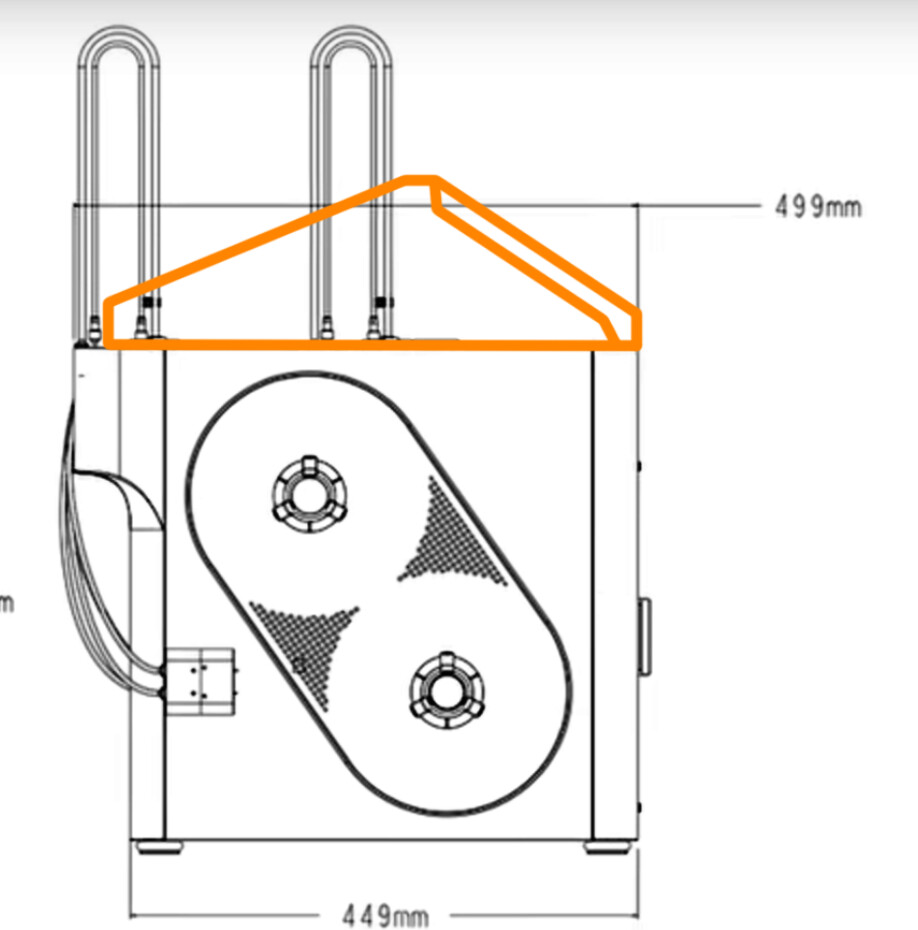
  • I’ve sketched a Cybertruck-style double-slope roof, but the tricky part is routing the cable chain outside while keeping the print head and PTFE tube free, yet still holding enough heat in the enclosure. Like this:

5.Following the feedback, I’ll add a 5 V LED strip.

  • If I want dimming I’ll probably throw in a Nano; whatever extra hardware it drives(maybe fans…), the supply must handle the current.
  • First choice is to steal power from the printer itself—if that falls through, I’ll just buy a ready-made module.

6.The extra space might as well be used to add a tool storage box.

1 Like

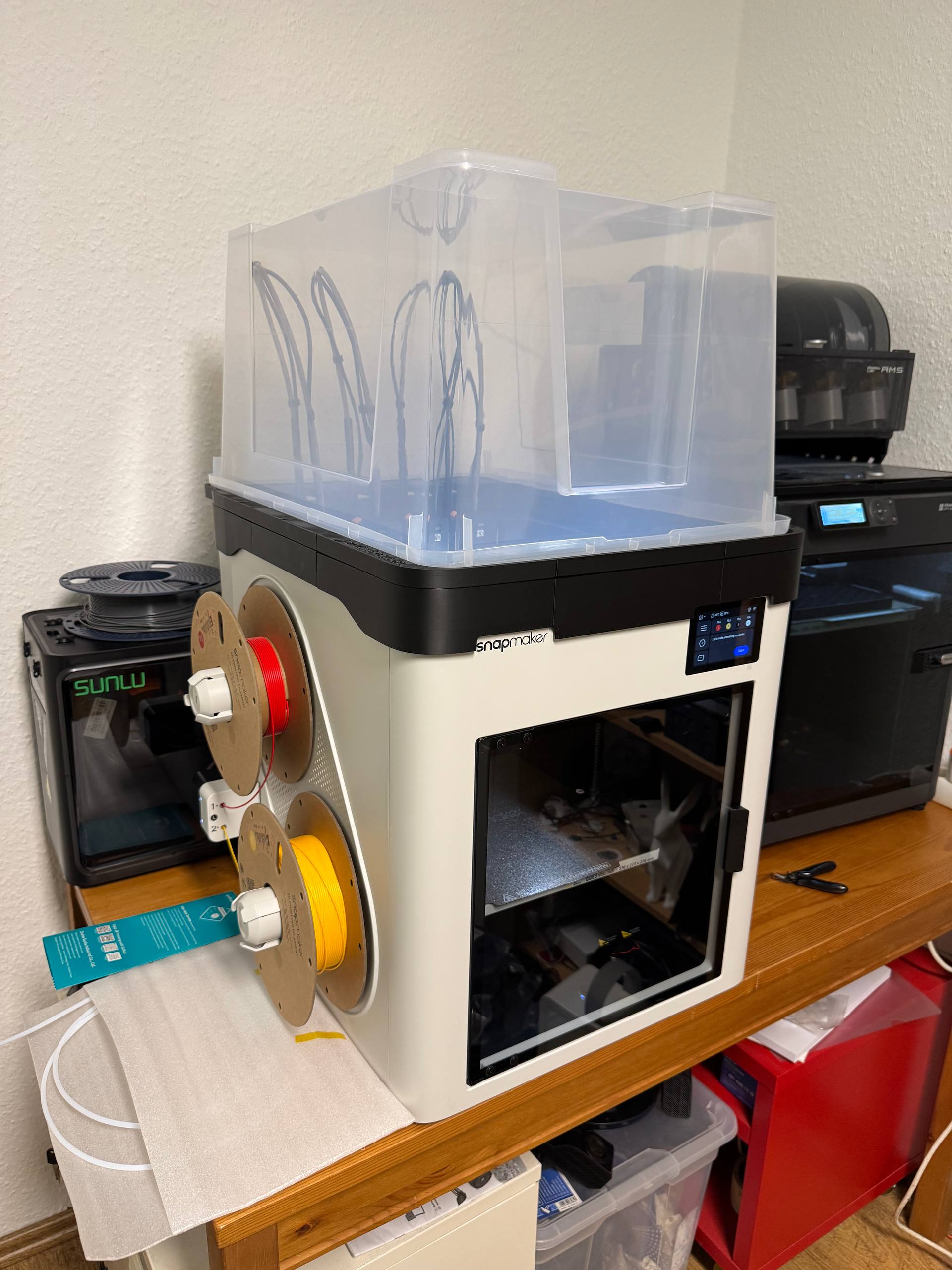
Don’t you want to try the IKEA hack?

  1. https://makerworld.com/models/2031310

photo_5274230156459445075_w

7 Likes

Its COOL!!I can offer everyone one more option!

Update, pleeeeease!:face_blowing_a_kiss:

My machine has arrived—time to start detailed planning for the top enclosure.

Quick update:

1.What material should I use for the printed parts?

  • I checked with the staff: the chamber temperature can go up to 60 °C, so PLA is out . Unless you plan to never print high-temp materials in winter.
  • So pick a filament whose glass-transition temperature is above 60 °C. The cheap, easy choices are ABS, PC, or PETG.

2.Besides acrylic, are there any other options for the clear cover?

  • I asked a few friends and they advised against acrylic; they suggested using translucent PC board instead — it handles heat much better and it’s the material most commercial enclosures are made from.

3.Which standard screw size can cover everything—ideally just one?

  • Check the screw diameter first—the enclosure hardly bears any load, so M3 or M4 screws will be more than enough.
  • If possible, screw-free assembly could also be considered.

4.The official dome is pretty tall; any tricks to cut down on material?

  • I’ve sketched a Cybertruck-style double-slope roof, but the tricky part is routing the cable chain outside while keeping the print head and PTFE tube free, yet still holding enough heat in the enclosure. Like this:

5.Following the feedback, I’ll add a 5 V LED strip.

  • If I want dimming I’ll probably throw in a Nano; whatever extra hardware it drives(maybe fans…), the supply must handle the current.
  • First choice is to steal power from the printer itself—if that falls through, I’ll just buy a ready-made module.

6.The extra space might as well be used to add a tool storage box.

————————————————————————

Quick update:2025-11-30

  • Surveying enclosure

  • If you want to design the top cover yourself, here’s the 3D model of the U1 enclosure and key structures I reverse-engineered, packed as an STP file.
    (PS: dimensions are not 100 % guaranteed, but I matched the real specs as closely as possible.)Snapmaker U1 3Dmodel.zip (592.8 KB)
2 Likes