(2026-03-05)
【Offical version Firmware】 is ready for Artisan, you can download it.you can download it. The official machine firmware will be push before 2026-2-30.
Download
-
EN:Version:V2.8.0 (2026-02-10)
-
CN:Version:V2.8.0 (2026-02-10)
Changelog-
-
Added Direct Machine Connection support for Snapmaker Orca. You can now send G-code to your machine over Wi-Fi without using Luban as a transfer station. Snapmaker Orca communicates directly with your machine through the OctoPrint protocol.
-
Added a Repeat Job button on the touchscreen. After a 3D printing, laser, or CNC job finishes, you’ll see an option to repeat the job and start it again with one tap.
-
With the beta firmware you no longer need to open Snapmaker Luban first to establish the connection. The only difference from before is the IP-address format, which now becomes: current device IP:8080 , e.g., 192.168.0.1:8080 .
-
For detailed steps, please refer to the WIKI:Click here to wiki

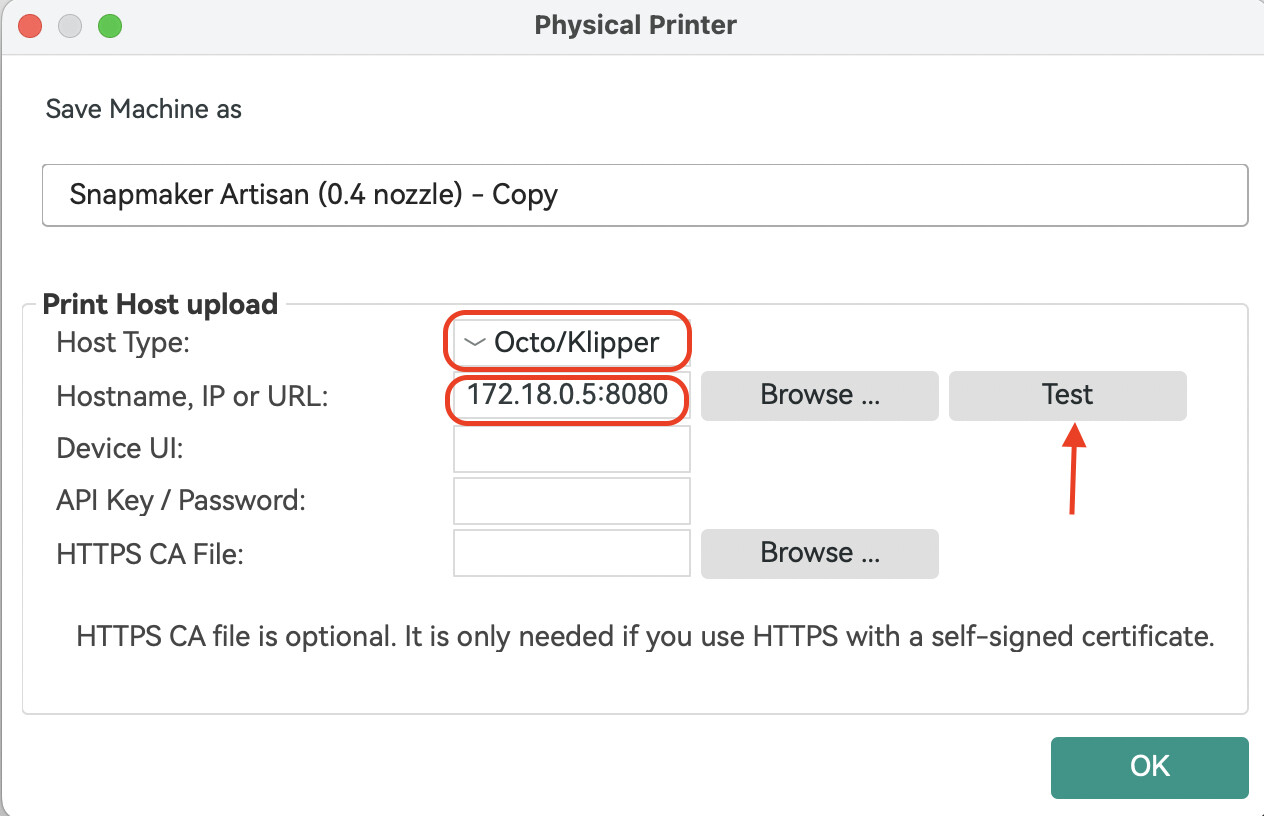

________________________________________
Known issues
-
When using the single-head dual-nozzle setup for bed-level preheat or XY-offset calibration, uploading & starting a print from Orca will interrupt the calibration.
-
Uploading & starting a print from both Snapmaker Luban and Snapmaker Orca at the same time will cause the job to fail.
-
In some cases, sending a file via Snapmaker Orca may stick at 0 % upload progress; if this happens, restart the machine and provide logs plus a description of the problem.
-
When using the rotary module, the “re-print” function may occasionally restart the job at a different origin.
____________________________________________________________________________
Snapmaker Artisan Firmware
Mar 6 2026: Snapmaker Artisan V2.8.0
Changelog
Touchscreen
New Features
-
**Added support for direct network connection between the machine and Snapmaker Orca.**You can now send G-code to your machine over Wi-Fi without using Luban as a transfer station. Snapmaker Orca communicates directly with your machine through the OctoPrint protocol.
- With the firmware you no longer need to launch Snapmaker Luban first to establish the connection. The only difference from before is the IP-address format, which now becomes: current device IP :8080 , e.g., 192.168.0.1:8080.
-
Added a Repeat Job button on the touchscreen. Once a 3D printing, laser, or CNC job is complete, you can repeat it with a single tap.
-
For step-by-step instructions, please click here to view the related Wiki article.
Known issues
-
When preheating the heated bed or performing XY offset calibration using a single-head dual-nozzle, uploading and starting a print via Snapmaker Orca will interrupt the calibration process.
-
Uploading & starting a print from both Snapmaker Luban and Snapmaker Orca at the same time will cause the job to fail.
-
In some cases, when sending a file via Snapmaker Orca, the upload progress may remain at 0. If this happens, restart the machine and provide logs plus a description of the problem.
-
When using the laser module for a reprint, pausing during the downward movement may result in a failure to return to the origin.
Downloads
md5: 7caf49f9b3a5dd0a47448d67e1cf12fe