So by far the first thing to do is dry the filament. Even brand new rolls can come moisture-laden from the factory, and no amount of tuning can help until it has been dried. Go ahead and give the print sheet a good cleaning too just to make sure there are no residues left behind on it. Once it’s clean, avoid touching the surface with your hands, as skin oils can transfer to it and mess stuff up easily too.
As for the other settings, I would honestly just go ahead and do them all at the same time. These are the settings I use for printing PETG on my Snapmaker 2.0 A350. Most of the rest of your settings look pretty good.
Ok, I dried the filament at 145 F for 48 hours, cleaned the print sheet and then printed using your settings with a z height of 0.2.
Increase bed temp to 80C
Set Initial Layer Print Speed to 15 (PETG like to go slower than PLA)
Set all other print speeds to max of 40
Set all travel speeds to max of 80
Reduce cooling to 20%
Reduce retraction distance to 0.2
Reduce retraction speed to 30
And… I got a pretty good print! For some reason, it printed to 95% and then stopped. The power was flickering while I was away, so that might have been why. I thought I was in the free and clear so I kicked off another print with the same exact settings and it failed along with every print since. I even dried out the filament again for 24 hours.
What it is doing now is printing what looks like a good base layer and then for some reason or another, the filament stops feeding. When I remove the filament there are lots of little shards of filament behind the front access door where the gear has been grinding away at it. All of this started happening after running an extruder e-step calibration (from 212.21 to 235.78889). Maybe I should set the e-step back to what it was and print with the defaults. At least then I was able to get prints to finish, I just wanted to get better prints.
Providing there is nothing causing the filament supply to be restricted (stiff spool, etc), it appears then that it’s having a problem pushing the filament through at that speed. It takes a moment for the filament to heat up, therefore pushing on it before it’s ready is going to cause these kind of problems. I found this out when trying to use a 1.0mm nozzle. Obviously you can’t heat the nozzle any more beyond the ideal temp for the plastic, so the only thing you can do, if the nozzle itself is clean, is to slow down the print speed. Also, make sure the gear is clean all the way around.
Thanks for the reply @Boxkite. The filament comes off the spool smooth like butter so it’s not that. I’m running my prints at 245 right, I’ll try 250 and bump down the print speed from 40 to 20. I cleaned out the gear as well.
If you are going to be running a lot of PETG, you need to consider upgrading to an all-metal hotend. The PTFE liner inside the stock heat break starts to degrade around 230-240C, with higher temps accelerating it. Eventually it will degrade enough to cause the hotend to clog, whcih is often misdiagnosed as the extruder gear slipping. It can happen in as little as 1 spool. It’s entirely possible that you may already have this problem, or that the hotend clogged during the power surges you mentioned, preventing it from being able to push the plastic through at the increased speeds of the higher layers. You can read in-depth on the issue here:
I’m running another print now with the same settings except for print speed which I’m increasing to 30. I have some all metal heatbreaks and new brass nozzles arriving on Wednesday.
Thanks again to everyone who has helped me out on this journey, I appreciate it.
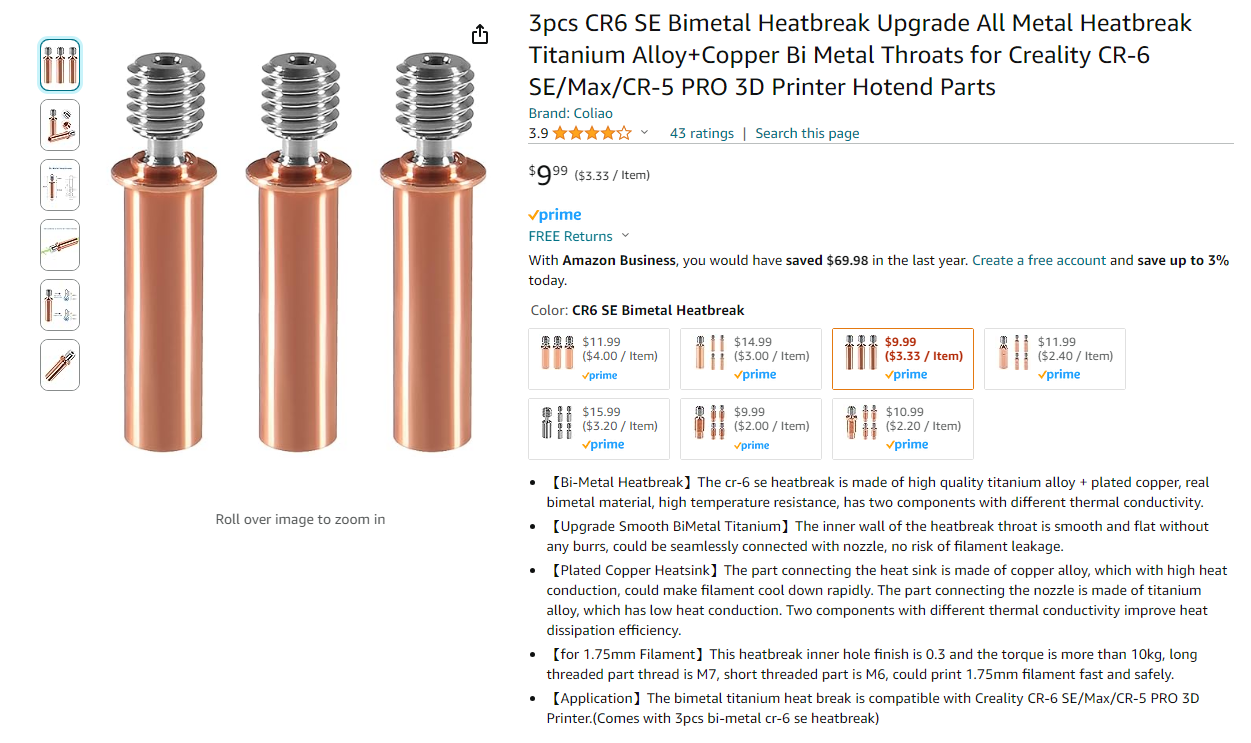
These are the ones I got. They have been working fantastic. One thing to note though is that these require a very short section (13mm) of 4mmODx2mmID PTFE tubing (I used Capricorn) at the very top; nothing like the stock version.
Maybe it’s a country thing? I am in the USA; all 6 choices are available in stock with Prime shipping, and the link takes you to the exact one I ordered already chosen from the list.
Yes, that tubing should be perfect. Installing it is about as easy as anything gets. Put it in the top of the heat break (it will be obvious), and use the flush cutters from the SM tool kit (or a nice, sharp, new razor blade) to cut it flush with the top. Done. Easier than a piece of cake.
Interesting. That guide was designed to help with flexible filaments like TPU, not stiff filaments like PETG. I won’t deny that it may help, but if this is required for you to print standard stiff filaemnts, then I would venture to say that something else is wrong with your printer or settings. The print head extruder gear area should work just fine in stock form for basic PLA, PETG, and ABS/ASA.
Bummer. In that case, look for a CR-6 SE, bi-metal heatbreak.
Here is a screenshot of those one’s I have been refering to on Amazon, and a link to some you could find on AliExpress to reference against.