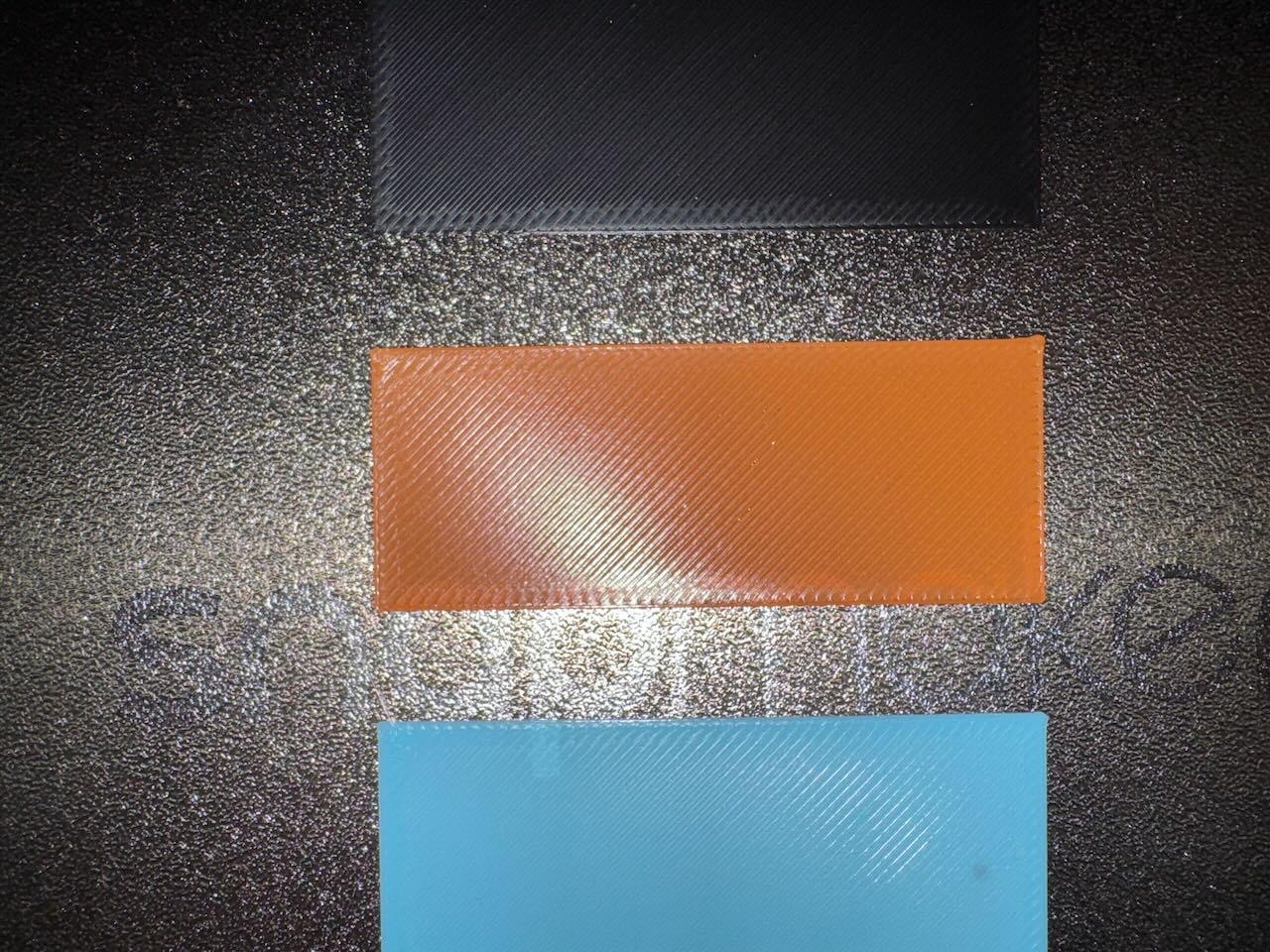
Is there a way to clear the tool head EXTRUSION FLOW CALIBRATE setting?
I was having issues with a good first layer and so manually calibrated the bed level, did a heated bed level and then did a toolhead offset calibration and got fantastic first layer now.
HOWEVER, this only seems to be working on toolhead 1. Switching to toolhead 2/3/4 gives me absolutely horrendous first layers and when I did the flow calibration it made it even worse and toolhead 2/3/4 are almost unusable in terms of the quality. I’m guessing it’s making some sort of flow adjustment inappropriately. I swapped filament between toolhead 1 and 2 and toolhead 1 regardless of the filament works fine so it isn’t the filament itself.
It’s possible this is a weird firmware 1.1 issue because calibrations and settings even when using flow calibration were decent before. My only issue was the edge of the bed plate which is why I did the manual z calibration to correct it and it did. This is the first full calibration I’ve done with the new firmware. (FYI the machine has been turned off and on since updating.)
What are my options or should I just do a full factory reset and start over?
See attached photos and keep in mind they were better prior to flow calibration but still bad. (brown is toolhead 1, black=2, darker blue = 3, light blue = 4) (unfortunately I didn’t realize the light blue photo was blurry until removing from the plate)
The toolhead calibration issue is what I’m concerned about. I’ve done it more than a few times and not had an issue so that’ll likely be my next try is to run the calibration again.
Thanks for the info about the reset when unloading.
Also, I was unaware the ORCA setting overrode it BUT it doesn’t seem to override it completely because two sends of the same g-code from SnOrca gave me two different results before and after the flow calibration. Which setting are you pointing to here? Is it the ENABLE ADAPTIVE PRESSURE ADVANCE or one of the others? Adaptive is the only one NOT set on my profile.
The calibration/flow adjustment is something that didn’t make sense to me exactly how this is handled and I’ve not seen it spelled out precisely because there is a setting for this in Orca already so how does it pair with it?
But you mean the toolhead calibration where you’re supposed to clean each nozzle with the metal brush? And then, on the left rear without the leaf spring, at the round indentation, the nozzle is missing?
But looking at this print image, the overlap of the infill with the contour is standard at 25%. Your infill lines are covering the contour almost 100%. I really think the nozzle is too close to the print bed.
Nozzle too close is what I’m thinking because it isn’t the filament or the filament settings because swapping filament between toolheads, the issue stays with the toolhead not the filament. My only explanation really is a bad toolhead calibration. After resetting the filament extrusion flow calibration by removing and reinserting the filament it got slightly better but still is bad on toolheads 2/3/4.
FYI - I have done the flow calibration within SnOrca and got the settings that worked perfectly up until earlier today which is when things went bad. Plus, the fact that toolhead 2/3/4 is the issue seems to point to toolhead offset too because I’m surmising the toolheads 2/3/4 are calibrated as offsets to toolhead 1 so toolhead 1 working if it is say the ZERO point would be about right.
I guess it is worth noting that if you do a tool offset calibration you need to check the results before assuming it is right.
I did the calibration AGAIN and it solved all the problems. Very odd but I’ll take it as it appears to be fixed. Worth noting that I did NOT do an Extrusion Flow Rate calibration and am using the flow rate settings I arrived at with the Flow Rate YOLO test in SnOrca. I think these first layers look really good now.
Based on your statement, you likely assume that the printer is calibrating the material flow ratio — values such as 1.0, 0.98, or 0.95 that define how much material is extruded overall.
However, this is not the case.
The Snapmaker U1 performs a dynamic calibration that adjusts the Pressure Advance value instead.
Typical Pressure Advance values are around 0.02 for PLA and 0.04 for PETG.
Pressure Advance controls the timing of extrusion during acceleration and deceleration in order to maintain consistent extrusion, while the material flow ratio only affects the total amount of extruded material.
Although both parameters influence print quality, they represent fundamentally different calibration mechanisms.