Advice for making a very large ring with very smooth surface

First off, I do not yet have a Snapmaker 350, but I will soon. It will be a Snapmaker as I will need all 3 functions, print, CNC and laser, maybe even the rotary mill.

I am designing a device that has 3+ very difficult parts to make, and I am seeking advice on how to plan and eventually print them.

One part is a pair of radial ball bearing races, approx 300mm outer diameter and about 250mm inner diameter, in 2 parts with 1/4 inch ball bearings in between.

The rings have to be as circular as possible and the inner bearing surfaces as smooth as possible. (There does not seem to be any way to attach a drawing to this question)

My question is two fold. How accurate is the Smapmaker in making large diameter “perfect” circles?
and, how can I get very smooth inner surfaces for the balls to ride on? The bearing will not have to support much weight, maybe 1/2 kilo tops.

Your advice on this will also partly answer my other difficult parts, a 200mm diameter bevel gear, an 80 - 100mm diam. bevel gear and a 25mm diam. bevel gear. I will need some advice on making those gears but I will ask for that later on a separate topic.

Thanks, jgb

You need to get to trust level 1 by doing the things listed here: Understanding Discourse Trust Levels

I printed bearings and finished by sanding to final size on a “lathe” (drill press, lol).

Quite:
https://support.snapmaker.com/hc/en-us/articles/360046836553-What-are-the-repeatability-max-travel-length-and-backlash-of-the-linear-modules-of-Snapmaker-2-0-

If you measure and enable backlash compensation it is even better. I use backlash compensation of 0.02mm and can detect movement down to 0.015mm.

Finishing after printing, by sanding, chemical smoothing, or some other post process.

Print with supports if necessary, should be easy enough, there’s lots of examples online.

3D printing shines when there’s good contact with the build plate and the aspect ratio is reasonable (no tall thin prints). Something like a bevel gear is pretty straightforward.

Thinner layer heights will be better.

Thank you Brent113. Good reply.
jgb

From what I’ve found, it seems like 3D printers don’t do ball bearings well, but they can do something similar. 3D printing works by melting filament and depositing it on something, like the build plate or the previous layer, working from the bottom to the top. Spheres don’t work particularly well due to the way they go from a point at the bottom to a large circle in a very short vertical distance. Normally that can be handled by using supports, but that doesn’t work when the spheres are inside the piece.

Some people smarter than me have spent time designing cylindrical bearings, which are more 3D printing friendly. There are a lot of models, but I’ve seen:
Open sided
Closed sided

I’ve printed one of the Closed sided models, using the loose tolerance models (tolMax). Even so, I had to do a bit of work with an xacto knife before they spun smoothly, and it needed a bit of a wear in to get really smooth. Because I used the tolMax, the bearings have a lot of play. I have not attempted the tight tolernace (tolMin) models yet. I have a bit of a problem with elephant foot that I need to address before I attempt that, but it’s mostly only a problem for prints this this.

I highly recommend going through the 3D Print Guide to dial in your printing accuracy before attempting anything that requires tight tolerance. It wouldn’t hurt to try several of the newer benchmark standards like the Print In Place Engine to make sure you’re happy before attempting your bearings.

Aside from the printer, the circles will only be as circular as your models. All the 3D modeling software actually does points and faces instead of true arcs. I use TinkerCad, and it only allows up to 64 facets on the cylinders. Better software will get you better models, but I don’t have any experience with them. Even if the software did allow true circles, the Slicer (Luban) breaks everything up into line segments too. At small diameters, it doesn’t matter much, but at 300mm, you’ll probably notice the flat spots. I don’t feel like dusting off my geometry equations to figure out the circumference difference, but I’m guessing it’ll be in the ~0.1mm range. If that’s too much deviation, you’ll want to print it slightly oversize and with thicker walls, then sand it down to be a true circle. I would definitely do a lot of test prints to make a 1mm tall circle before I attempted the entire bearing structure.

For the bevel gears, I think the model facets won’t be as much of a problem as for the bearing. But YMMV.

Good point @clewis, the printed bearings I used are similar: 608 Bearing Replacement (print in place/fully printable) by drewbrewchan - Thingiverse

If you re-read his original post he’s not trying to print the bearings - just the races.
He’s using 1/4" ball bearings.

-S

I want to echo @clewis’s point about the larger diameter, I recently modeled printed a cylinder at ~150mm, and the facets are extremely obvious:

I can only assume they’ll be that much more obvious at 300mm.

Granted, I used onshape to model this, which is likely very limited (it runs in a browser!). Also, if you take @brent113’s advice and plan some post processing into the end, you’d probably come out ok. You could even print a jig that lets you spin the printed parts with a static sander to ensure pretty close to perfect tolerances.

Thanks for that. For the smooth surfaces I plan to use about 360 facets or segments to avoid the flats. I will make the number of segments as close to the accuracy of the printer that I can.

For surfaces where smoothness is not really needed, anywhere from 24 to 120 segment circles will be used.

Making a separate jig to hold the part for post surface processing is a good idea.

jgb

Just printing the races. I’ll buy the steel balls and design the races around them.

The bearing races don’t need high precision, just be circular and smooth enough to be driven by a small motor at about 100 rpm or less, lightly loaded.

I’m using SketchUp 3D to model. Circles and arcs are all multi segment polygons in the file, but are displayed in a smoothed arc. I didn’t know Luban also makes its own segments for curves.

  1. You should give a shot to a parametric modeler. If you know and love SketchUp, that’s fine, but defining models parametrically is much easier for parts like you’re making. For example, define the race cross section as an offset from the ball bearing diameter, then extrude by rotating about Z into a solid shape. If you ever need to modify, change the original cross section and everything else updates automatically. Fusion and FreeCAD, and others, can do this.

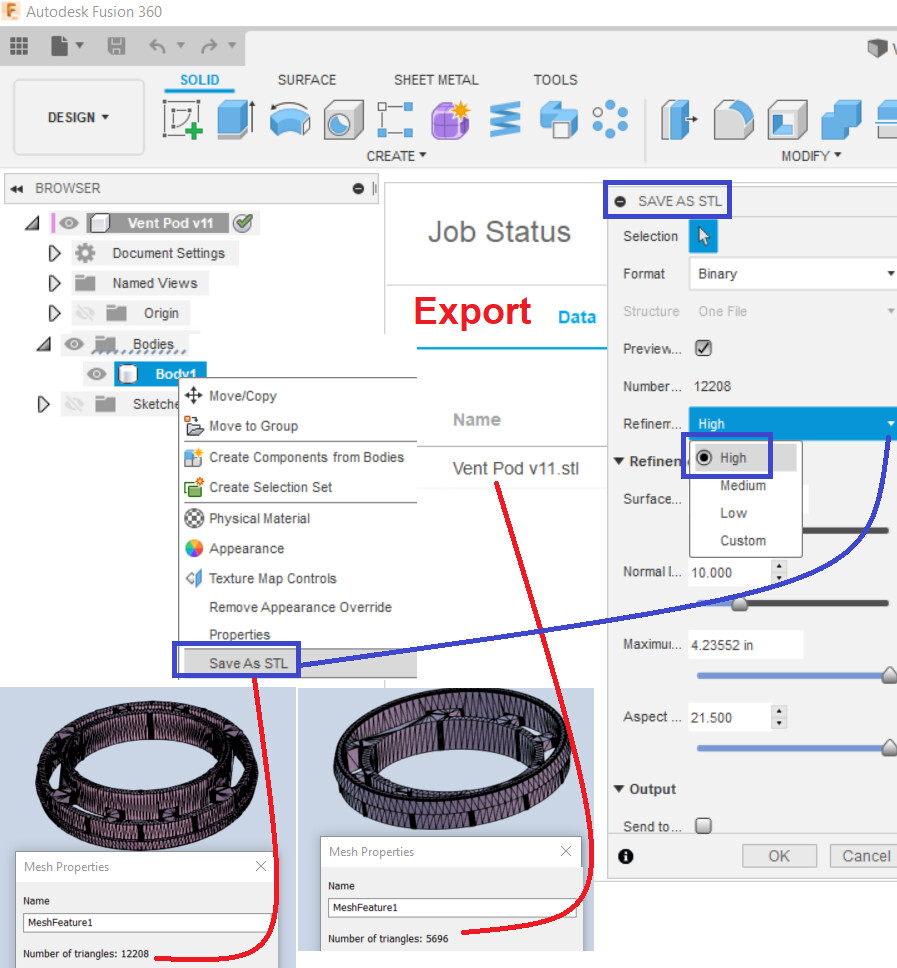
  2. Circles and arcs are exported to .STL, which is a triangulated format with no curves. This is where the curves are flattened into segments, as it’s leaving SketchUp. Luban is not generating segments for curves. I don’t remember if there are STL export options in SketchUp, but in Fusion360 you choose the number of facets (indirectly) when you export to balance between file size and smoothness of curves.

Thanks, but I will stay with SketchUp (SU). No time or patience to learn a new CAD.
SU is a surface modeller but can make solids, and has an .STL export.
My version of SU has many add-on extensions and my own personal tweaks to make it comfortable to use and do what I want.

You should look into SubD or some other way of increasing the number of facets in the geometry since SketchUp doesn’t natively support variable export resolution.

Or you could use Cura with the ArcWelder extension, although the Snapmaker currently has unpredictable issues sometimes with arcs, something the developers are still working on fixing.

For testing purposes, the different print quality settings in Luban (Fast Print, High Quality, etc) won’t affect any of the things I mentioned above. If you’re at all concerned about tolerance, print off a part with a 0.32mm layer, 0% infill, and test it. That’ll still take a while to print races 300mm side, but you’ll be able to see if the facetted surface will be a problem or not fairly quickly. You probably won’t even need to print the whole part, just stop half way up. Then it’s easy to fill the steel bearings without caging them, and feel how the races move over them.

If I’m being lazy, I might just print everything a bit tight. The steel bearings will wear off the high spots fairly quickly. It’ll be a bit chunky to rotate the first couple hundred revolutions, but should wear into a smooth acting part fairly quickly.