Dear Community,
I am sure it is on me, but I cannot make the A350 print properly.
I have a A1 at home which works beautifully with Orca Slicer and mostly no issues there.
But with the A350 the Filament gets stuck to the build plate so strong that I cannot take it off? It’s glued on. I did not use any glue, the plate heated up properly, STLs were processed through Luban, even used the internal feature to slice the stl.
As a Filament I used the one in the package and also PolyTerra’s PLA.
How can a print stuck to a plate so tough that one cannot get it off. Not with a scraper, not with Isopropol, nothing.
I am not really a Tinkerer, I don’t want and can’t spend hours figuring out what could work, I kinda need fast and stable results and I am not doing anything uber-complex with the machine.
Any advice other than “check the manual” would be appreciated.
Thank you all!
Once it is baked to the printbed it can be pretty hard to get in off.
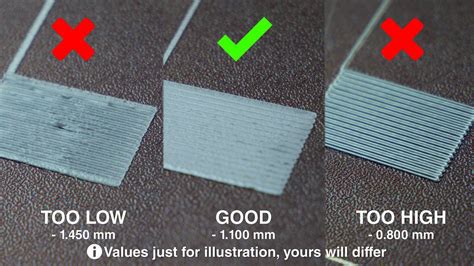
First of all, check the first layer. Do not print too low. Otherwise you can try to lower the heatbed temperature.
To remove the Print, you can try to heat it up and remove it gently with a scraper.
Swipe to the left and increase your live z-offset while starting the print.
It seems your nozzle at the first layer is too near to the bed.
Check this image for reference:
Hope this helps.
it is actually impossible to get it off the plate.
I gently tried the scraper, no way this was going anywhere, soap, isopropl alcohol, nothing works, the thing is fused harder to each other than
Printing too low, yes, though of that, but I really took the standards from Luban and did all the calibrations.
Laser works fine and proper, but printer seems to also miss the mark when calibrating? Like normally it should dip onto the screws as it’s points of ref, it does not, it’s like 2cm off on the right end, left side is fine. It is a bit weird.
I expected it was a construciton issue, that I put a thing somewhere where it should not be, but the Laser does not seem to be affected, so no idea.
The calibration of the 2.0 is a nice starting point. But the z offset is not perfect. You have to set this manually everytime. Do the first print with Skirt with 3-4 lines and check the layer.
Did you tried to set headbed to 80° and try to scrape the object gently from the plate? Do not pull on heated platform, just horizontal scraping.
But you can also buy just a “bambu like” PEI sheet on the internet. The snapmaker ones can be very connective to PLA and PETG.