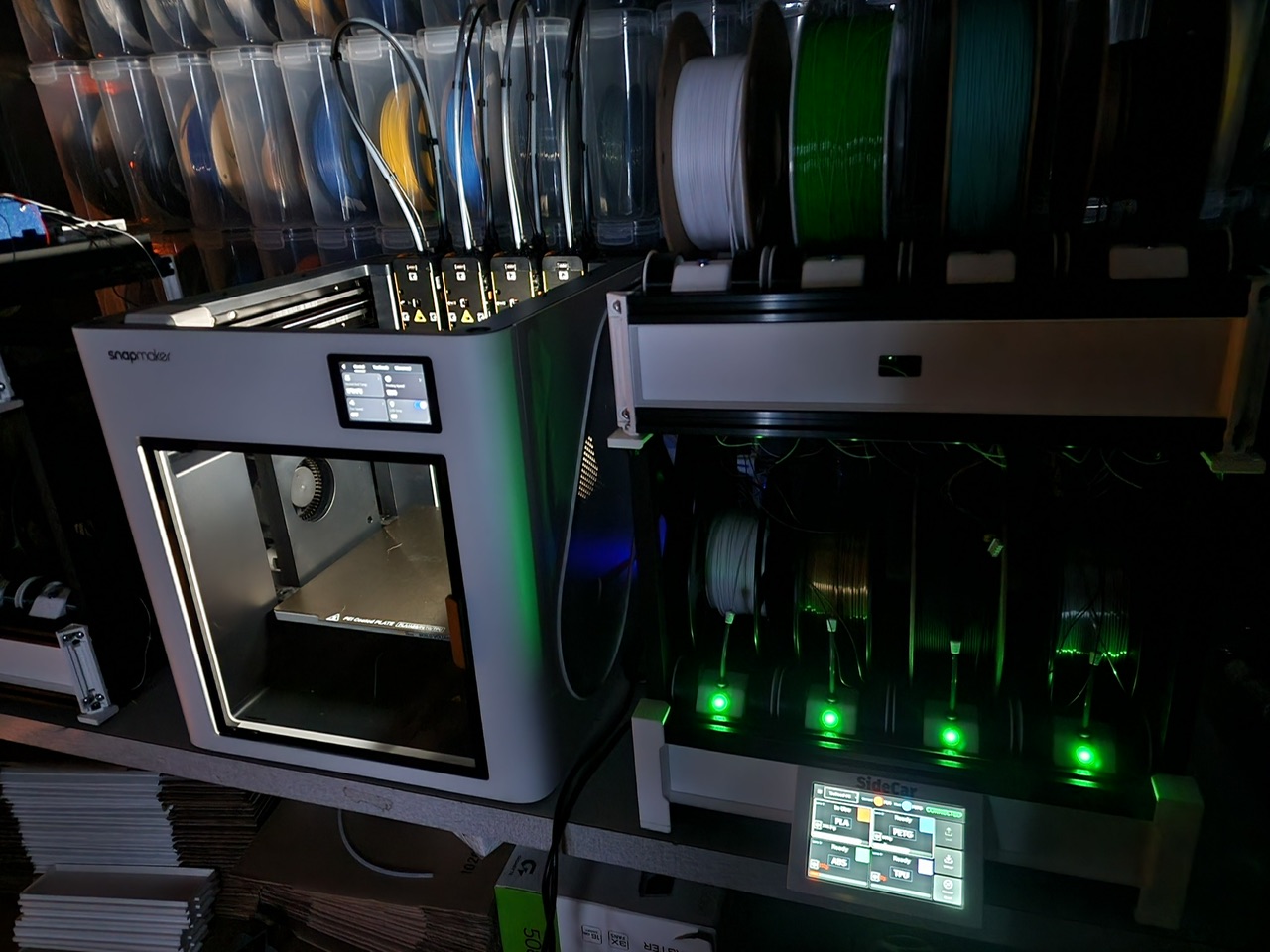
Snapmaker Automatic Material Managment (S.A.M.M)

As the top player in the tool changer market . Snapmaker…. Its time to build a filament managment system. Bambu, Anycubic , Creality ,and even the Diy section is getting one via BTT.

Snapmaker made the best 3n1 solution, the first to the IDEX which no one has beaten, the best quick swap dual extruder for the artisan, the first to incorperate embeded liner rails in a 3d printer. And now they went to the world with the U1 and said this is how tool change is done. Bambu’s multiple hot end system is garbage, and lets not even mention Pursa gazillion print head system which By the way is still slower even with 12 heads. So Yeah the U1 is TOP DOG !

Now its time to show them all How to build a Filament Management System. Make it: Dry faster, hotter, make it expandable, reliable, Afordable and most of all make it integrate with the previous printers…. starting with the U1 of course..

just sayin

SnapMaker the Filament Management System. Just SnapMaker IT….

6 Likes
1 Like

There is a very interesting project on Facebook (spit!), on the Snapmaker U1 channel. Here’s the post: https://www.facebook.com/groups/snapmakeru1/posts/1191669763037068

In case you can’t read that, I’m replicating it below (sorry Eric, hope you don’t mind). We need to get that guy involved over here.

Eric Nelson’s post in the Snapmaker U1 Facebook group:

Ever since I saw the first leaks of the U1 I had this idea in my head of why not swap filament on the toolhead(s) not being used, while the active toolhead prints? That will basically erase any filament change time wasted in a normal AMS system (this is the downfall of the “innovative” H2C for over 7 colors,it still just sits there while changing).

We can’t save purge waste like a nozzle changer or just adding more toolheads, but this is a great optimization for people who value the TIME it takes to print, which was always my issue with AMS prints, I didn’t care as much about the poop waste, filament is cheap, but some prints ended up taking up the printer(s) way too long, and that’s what this mainly tackles.

There is still purge savings, as it uses tip tuning vs cutting the filament, and if you properly use -flush to infill- there is VERY little waste (you should be using flush to infill on any filament swapping printer when you can get away with it).

I’ve been working (way too much) on getting this done ever since mine arrived.

I’m calling it Sidecar.

7-10-13-16 (or more) colors.

Swap/purge while other toolheads are printing, no time added to print in most cases.

MMU Mechanicals based on the Box Turtle (frame, extruder, respooler system for now), working on a complete custom MMU system for the future.

The ViVid was considered since it has RFID and Drying, but it didn’t have the amount of controllability and customizability I wanted.

Custom RP2350B based MCU

Preprocessing/optimization engine that helps you rearrange spools between static tools (if any) and Sidecar units, and/or color order in Orca, for the least amount of purge waste and color swap down time, if you chose.

Actual filament weight remaining on each spool from a load cell under each tray, (not just estimated like spoolman etc) no more wondering if you have enough left on a spool, the Sidecar warns you if any spools needed for a print don’t have enough to finish it,and just glance at the touchscreen to see exactly how much is left on each one.

Supports concurrent loading of all 4 toolheads, if you’re just printing a 2-3-4 color print, Sidecars will unload/load the needed filaments and purge them all at once, saves a little print start time.

Although I never use it and find it gimickey, RFID support IS built in using NTAG open source tags.

Enlarged purge bin that goes to the bottom of the U1 (really not needed except for huge prints with tons of color changes if you are NOT using flush to infill)

I know there is an obsession with dryers in here, these *can* be enclosed and dryers attached, it’s just not a priority right now and I think the need for them is overblown, at least to be part of an MMU/spool holder system.

Streamlined connections:

USB-LAN from U1 to SideCar for MMU Engine communication.

6P cable for QuickPurge bracket control.

4P cable connected to each 4-1 combiner/buffer assembly.

Auxiliary Sidecars plug into the main with standard USB-C cables.

I’m working on getting the last auxiliary Sidecar built so I have all 4 toolheads swapping colors in the same print and I’ll be back with some videos of the action on a 16 color print.

5 Likes

The Snapmaker U2! *Coming Soon. :wink:

1 Like

I don’t use the popular social media site BookFace, The Office reference, so I truly appreciate this! Please tell Eric that we want him here in the Forum :sign_of_the_horns::sign_of_the_horns:

I am sure that once we have a system with 8 colours, it ain’t enough. I do suggest to let Snapmaker settle and deliver the outstanding orders, get aligned with the market and deliver supplies to the market/global re-sellers, address all the small problems that might still occur, as usual with a brand new product, improve the software… and then….

1 Like

I’m not sure if there are any questions beyond what the repost of the Facebook post doesn’t answer, but I’m open to questions/criticism!

1 Like

I’m pleased you’ve come! Do you want to open your own thread, or carry on with this one? A new thread could have your own title…

1 Like

If you want to wait for an official Snapmaker solution, that’s your choice. Might be a long wait!

1 Like

I will start one when I have some videos of it in action, hopefully today or tomorrow.

4 Likes

Great. I’ll hold off questions until then.

Awesome, Welcome to the great Community here :sign_of_the_horns::sign_of_the_horns:

Thanks for sharing! Please keep us updated :partying_face:

1 Like

I love the idea! 16 Colors seems very doable and not that difficult. I realize more SQA needs done, but if someone did it, or almost did it, it seems to me that Snapmaker could just hire him to head up that project. And, it wouldn’t take that long.

The issue is: Poop. This delves into the realm of purge management. Right now, it’s very manageable, and much faster than Bambu. However, introducing all those colors into 4 print heads, just puts us right back into the mix with purge management and loss of print speed. Not to mention the slicer; which is where a bunch of “don’t let the user be stupid and ruin their print” testing and code will have to go.

1 Like

Sure it does, but that’s a choice. No AMS = no choice.

What I said in the previous thread on this subject, when I was just speculating, is that with no AMS option it isn’t so easy to choose the U1 over (say) Bambu. If an AMS becomes available, choosing the U1 becomes a no brainer (assuming you have the budget).

1 Like

I like the thought process; have four Toolheads and leave it as is or have the option to also have an AMS style purging system for occasional needs :sign_of_the_horns::sign_of_the_horns:

@Sidecar This looks awesome! Excited to see this come together and hopefully implement in my setup as well.

Instead of mapping four spools to a single print head, have you considered mapping an entire sidecar to a pair of print heads? This would allow either head in the pair (1+2 or 3+4) to pull from any filament in that sidecar, increasing the filament options available to each head and likely reducing the need to pre‑sort filaments for a specific print head.

This may add too much complexity. Wondering what your thoughts are though.

Purge waste is already 50-75% less than AMS type systems since it uses tip tuning and doesn’t leave a 50mm long bit of filament that needs to be purged out, but it’s still there, yes. I was mainly attracted to the U1 for the speed, not the waste savings, but it’s a nice benefit for sure. My time and the time my machines are tied up printing is worth a lot more to me than the purge waste, so if I can save 4 hours on a print but produce 200g of purge waste ($2) that’s huge for me. Many 3d printer users are just naturally impatient (or I should all humans in general lol) so I think the speed aspect while still offering 50% less purge waste is still a good tradeoff.

lost of print speed isn’t an issue. The parked heads swap filament while they are parked, so there is basically zero time added to prints, that’s the whole premise of this system.

So far the slicer is basically stock Orca with one added feature, “reverse tool order every layer”, an option I added in specifically for the Sidecar system, where it will use the previously loaded tools first on the next layer, to save time. Orca usually will do this on it’s own, but not when you have a custom first layer sequence of 16 colors like sidecar profiles do. The UI is very intuitive, only requiring you to re-order the first layer sequence to optimize the swaping order of the system, otherwise, “upload and print” works seamlessly just like sending to a stock U1.

Actually I originally designed a system that let any sidecar feed any head, but it never made it past the prototype phase as it was a spaghetti factory of PTFE and just not practical. With the ability to control the color sequence in Orca, the need to move spools around is much lower, really only when you need two colors that are on the same sidecar and it’s the only toolhead being used. If it was just one sidecar into two heads, that would be much easier and less spaghetti mess, so it’s an option.

1 Like

Here’s a manual unload/load process using the touchscreen.

2 Likes