Thank you.
Settings for set up are as follows. Still trying to figure out how to get subsequent passes to pick up where the previous pass left off (relative to the Z axis)

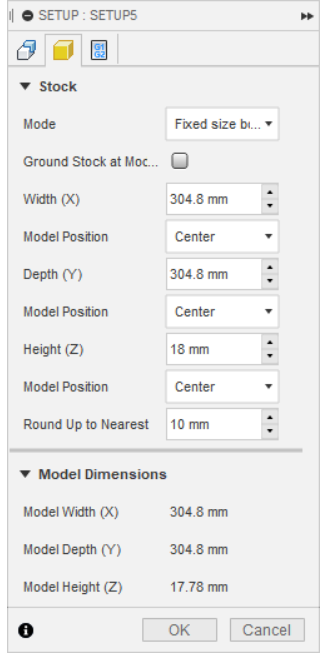

You don’t have a machine selected. If you have the SM config file for Fusion installed you should be able to select your machine.
I’d turn off the “round up to nearest”. Fusion is designed for pro use and most cnc businesses use preset stock sizes so that’s why that’s there.
Is your stock size your actual stock size that you entered? Or is that the size of your model?
Have you read this thread:
https://forum.snapmaker.com/t/some-info-on-cnc-tool-changes-and-combo-cnc-laser-projects
-S
I really appreciate the help.
I read the article you referenced & it offered good information.
Have I interpreted it to suggest that by setting a work origin (that doesn’t get milled in any of the passes, then adjusting the Z (only) to compensate for the different lengths in bits, that Fusion 360 subsequent passes will actually pick up where the previous toolpath left off?
Do you have any that show how to set up the Snapmaker 2.0 profile in Fusion 360?
As long as you don’t accidentally change the x or y, then yes. Take a picture of work origin on touchscreen in case you mess it up.
And as long as your settings are correct for heights and rest machining and consistent between your toolpaths. If you change something under setup (stock size, work origin etc) you need to redo all your toolpaths.
I don’t remember how to set up the profile. Long time ago now. I think there’s info now on support. Or do a search (Autodesk support forum). It was a little bit of a pain. Fusion does it’s installs strange and (especially on the mac) doesn’t follow standard conventions. So unless someone chimes in on here, you’re on your own on that part.
-S
I understand about not changing the settings and heights but what do you mean by the “rest machining” being consistent?
Rest machining is a setting that accounts for the roughing material loss, and starts where the previous tool ended.
Thanks BluegrassBlaster - how do you set it to pick up (with the lower Z) where the rough pass removed the stock wood? Why would mine have been hovering around in the air instead of dropping to the appropriate Z coordinate & picking up where the rough pass left off?
With rest machining turned on, on subsequent passes it should start off where the last pass left off.
Share your Fusion project and we can take a look.
-S
Thanks again - all of my settings are listed above.
Alternatively I’ll post a link to the start of the posts.
If I’ve missed anything that you’d need to see, just let me know.
Yea, looks mostly fine. And since I can’t actually look at the toolpath preview it’s going to be looking for a needle in a haystack to try and figure out what went wrong.
Without posting the file I’d suggest playing through the toolpath previews in f360 to try and identify where the issue lies.
I agree with what was suggested earlier, something about your fusion origin doesn’t match what you’re entering when you start the job. Or some spurious setting somewhere is causing an issue that is harder to troubleshoot than looking through screenshots of about a hundred settings.
If I had to guess stock rounding is still the issue, as Steve mentione earlier here:
Would easily explain about ~2.2 mm of the offset and you didn’t respond confirming you made a change based on that.