This version is a beta for Artisan, you can download and test it. If you encounter any issues, please leave feedback below so we can iterate quickly. The official machine firmware will be released before 2026-1-31.
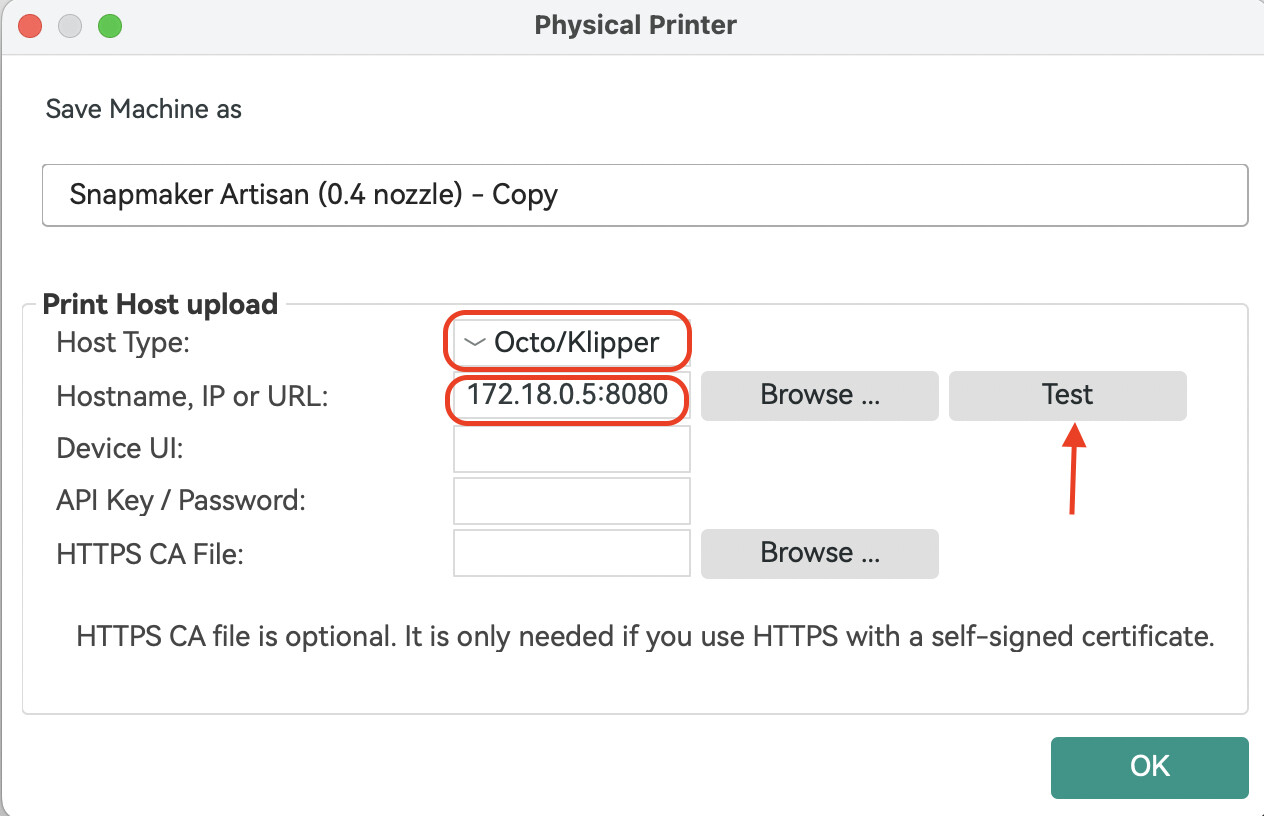
Added Direct Machine Connection support for Snapmaker Orca. You can now send G-code to your machine over Wi-Fi without using Luban as a transfer station. Snapmaker Orca communicates directly with your machine through the OctoPrint protocol.
Added a Repeat Job button on the touchscreen. After a 3D printing, laser, or CNC job finishes, you’ll see an option to repeat the job and start it again with one tap.
With the beta firmware you no longer need to open Snapmaker Luban first to establish the connection. The only difference from before is the IP-address format, which now becomes: current device IP:8080 , e.g., 192.168.0.1:8080 .
When using the single-head dual-nozzle setup for bed-level preheat or XY-offset calibration, uploading & starting a print from Orca will interrupt the calibration.
Uploading & starting a print from both Snapmaker Luban and Snapmaker Orca at the same time will cause the job to fail.
In some cases, sending a file via Snapmaker Orca may stick at 0 % upload progress; if this happens, restart the machine and provide logs plus a description of the problem.
When using the rotary module, the “re-print” function may occasionally restart the job at a different origin.
We’re collecting the issues you’ve encountered when using this beta version. Post in This Thread: Feel free to discuss any issues or feedback here.
I installed the new Firmware to the artisan and used the new snorca to add it as documented. Works great so far for printing.
I am currently unsure when I upload and start print directly. I think it is just using the inner heat zone. But i have to measure it first. Would be great to get asked or decide it automatically in slicer if full zone is required.
Thanks for the update. I’ve been waiting a long time for the Repeat button, so this is very welcome news.
I’d also like to reiterate the request from @Wyphorn for access to the firmware source code (HMI and main board). Opening it to the community could help accelerate the implementation of features like this and reduce your internal development load. Since the firmware is based on Marlin , my understanding is that source availability is generally expected when firmware binaries are distributed. I would be more than happy to follow it and contribute where possible.
Regarding the UI, I think “Next Job” could be removed and replaced with a single “Print Again” button—or even better, “Do Again.” Since this applies to CNC and Laser as well, “Print Again” is not always accurate. A single button, similar to Snapmaker 2.0, would look cleaner and more intuitive than using a dropdown.
It would also be very helpful to have an option to disable the startup guide when changing modules, as well as the laser password prompt—perhaps via an Advanced Settings / Advanced Password option. These guides become quite annoying for experienced users.
Another useful improvement would be setting fan and light power values directly on the HMI. Additionally, if the source code were available, I would genuinely enjoy spending some time developing an enclosure temperature control feature accessible from the HMI, which could significantly improve the printing experience with materials such as ABS and Nylon.
Issue:
In CNC jobs, using Repeat always moves the machine back to the work origin and dwells for about 2 seconds before reading the G-code. This behavior can be problematic if the work origin is located under the stock material.
Thanks again for the progress and for taking the time to review this feedback. I appreciate the work the team is doing and hope some of these ideas can be useful.


 I’ll get back to you once I have more info.