Originally built as a console tool to create a virtual camera feed from the Snapmaker 10W Laser for LightBurn. See: Working camera capture with Lightburn . It is now an all-in-one Windows console+web application, combining an HTTP web server, OctoPrint-compatible API, camera capture tools, file upload automation, remote control capabilities, and much more-inspired by many community discussions here.
Windows Explorer Integration
Run the provided installer script to add Snapmaker LightBurn Host to the Windows context menu for .gcode, .nc, and .cnc files. You can double-click, right-click, or drag-and-drop any compatible file onto the executable to trigger a fully automated workflow:
Power on (Kasa) → Home → Upload → Print → Camera → Monitor → Completion Sound Notification → Completion Email → Power off
A single interaction handles the entire job from start to finish. (Inspired by the drag-and-drop guide here: Guide: Automatic Start via Drag/Drop )
Upload Folder (Background Processing)
The application monitors an “Upload” folder in real-time using the Windows API. Save files directly to this folder from LightBurn or any slicer, and the app will automatically queue, upload, and process them. Once finished, files are moved to the Recycle Bin or deleted-keeping your system clean and clutter-free.
Web Dashboard & OctoPrint API
The built-in HTTP server provides an OctoPrint-compatible endpoint, allowing you to send prints directly from OrcaSlicer or Cura (via the OctoPrint connection plugin). Both upload-only and upload+print modes are supported, along with Kasa power-on, RTSP camera launch, and print monitoring.
From your browser, you can access:
- Upload page – Drag-and-drop files with a progress bar. Supports both upload-only and upload+print modes.
- Monitor page – Live job progress, elapsed time, and toolhead-specific data (Laser/3DP/CNC).
- Control panel – Home, Pause, Resume, Stop, enclosure fan/LED controls, and Kasa plug toggles.
- Capture page – Integrates the 10W laser camera with LightBurn (Softcam for v1.7.08 or earlier, HTTP API for v2.1 or later).
- Thickness probe – Measure material thickness directly from your browser.
- G-code console – Send raw commands and run macros.
- Laser calibration wizard – Step-by-step XY/Z offset setup following the official guide: 1064nm IR+20/40W + Lightburn Guide
- Configuration editor – Edit config.json in your browser without touching Notepad.
Mobile Page
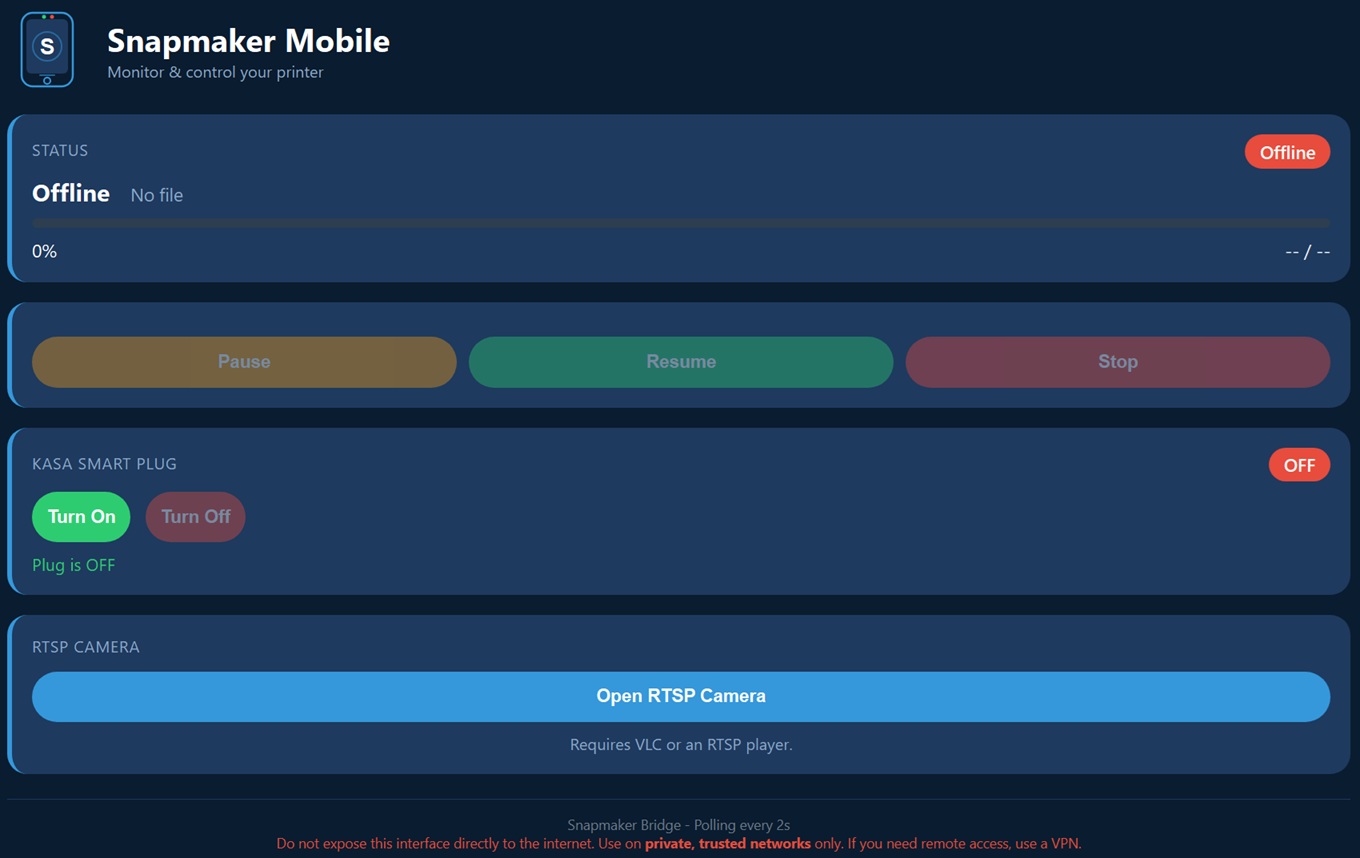
A touch-friendly interface designed for smartphones. Check live status and progress, control Pause/Resume/Stop, toggle your Kasa plug, and open your RTSP camera feed-all from your phone. Server status on the tray menu automatically generates a QR code(s) that links to the mobile interface. Scan the QR code with your phone’s camera to quickly access the touch-friendly control panel without typing the URL manually.
Tray
Launch common applications directly from the system tray (right-click the icon) if installed: Luban, LightBurn, OrcaSlicer, Cura, RTSP Camera (VLC), and Kasa (hs100).
Disclaimer
This software is in beta—not all features are fully tested. It should work with Snapmaker A250 and A350 models. For full technical details, please refer to the readme file. See attached screenshots.