Hi Wombley and enlightenonq
We can only share limited specs at this stage. The information available now is all listed in the FAQ.
I’ll keep you updated as more information becomes available.
Swapping filament in 5 seconds means more time printing and less time waiting.
Here’s how the SnapSwap™ system makes a real difference for everyday use:
 You can switch filaments cold, with no need to preheat or manually clean.
This saves you extra steps and keeps your workflow smooth.
No need to stand by the machine during filament changes.
The system handles the swap automatically, so you can step away and focus on something else.
Multi-color prints no longer take forever.
Compared to single-nozzle setups that require repeated purging, SnapSwap™ keeps things moving with minimal downtime.
It is made for users who are short on time or print frequently.
Whether you’re prototyping, running small batches, or working on regular projects, these time savings really add up.
 Watch the video to see SnapSwap™ in action:

Have more questions about SnapSwap™? Let us know in the comments. We’d love to hear from you.
Subscribe to the newsletter for updates: Snapmaker U1 Color 3D Printer
Some answers from @Jade for these questions, from the Discord server. Reposted with her permission:
- X/Y/Z offset will be done by one button offset calibration. So it will be even easier than the calibration workflow on J1, which I personally think is a quite easy one though. [Yes for auto bed leveling. So both yes for all X/Y/Z and bed leveling calibrations.]
- Yes for accelerometer based input shaping.
- Yes for pressure advance set per tool based on the filament used/profile.
- There’s a supported range for the spool hub diameter. I didn’t get a chance to check the exact numbers today. I’ll answer that later.
[I’d asked about z-offset and ABL as a separate question on Discord.]
All really exciting stuff! 
My 2 biggest issues with my J1 are the proprietary hotends and unreliable bed leveling. It looks like the U1 fixes the latter issue, but appears to have proprietary hotends, again. With the Bondtech INDX system launching in a few months, I am not sure I want to jump into another proprietary Snapmaker ecosystem.
#MakerTuesday
We printed a 9 cm baby dragon model using both U1 and a typical filament changer printer.
Same model, same density, just different systems.
U1: 5h14m, 96.44g Filament changer printer: 30h8m, 483.37g
U1 finished 6 times faster and used only one-fifth of the filament.
How much purge poop do you usually get when printing multicolor? Got a photo? Drop it below. Let’s compare.
For the latest updates: Snapmaker U1 Color 3D Printer
Does the U1 have a magnetic print bed or is it glass like the J1?
The latest email mentioned an app for monitoring. Is that app compatible with other Snapmaker machines? Where can we get it?
 MakerTuesday Multi-material printing doesn’t have to be slow, wasteful, or unreliable. With a toolchanger, U1 offers higher reliability, less print failure, and much more efficient material use compared to filament changer printers.

Here are two prints showing the difference.
(Same material setup used in both cases.)
 Bridge, PLA + PVA Support
U1 : 15h44m, 204.74g
Filament changer printer : 27h25m, 490.51g
 Dino skull , PLA + PETG Support
U1 : 14h, 305.38g
Filament changer printer : 33h20m, 646.14g
Have a multi-material idea you want to try? Tell us below!
Learn more about U1: Snapmaker U1 | Next-Gen Multi-Color 3D Printer Awaits
You were always good in Videos. Also on dual extruder. But my first experience there for like 2 month was just one heatcreep after another. I will first wait for normal customer reviews to see If this will be a good printer. A lot of trust needs to be regained first.
The U1 uses a magnetic PEI print sheet.
We’re still evaluating the app’s compatibility with other Snapmaker machines. More info will follow soon.
Thanks for sharing your experience. We understand how important long-term reliability is and really appreciate your honesty.
MakerTuesday: Filament Management on U1 · Auto Loading · Backup Mode · RFID Support. This short video shows how U1 simplifies filament management with automation.
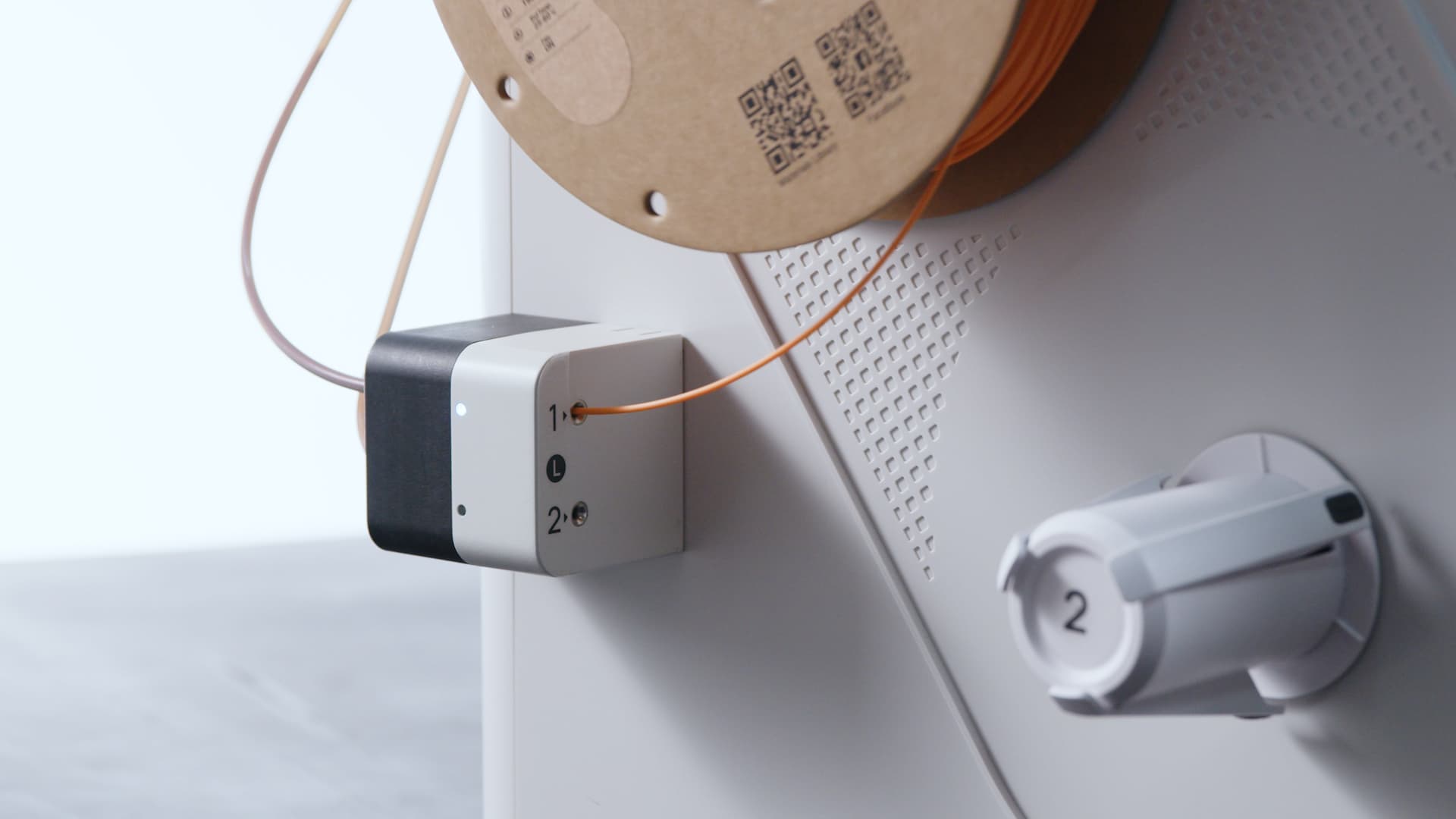
- Auto Loading
Hang the filament, tap the screen, and U1 loads it automatically. No manual loading is required.
- Backup Mode
When a spool runs out, U1 switches to another with the same material and color if available, so printing continues without interruption.
- RFID Recognition
When using Snapmaker filaments with RFID, U1 can detect material type and color automatically. (U1 also supports standard 1.75 mm third-party filaments.)
The RFID tag tells your printer what color and material is in there. Without the RFID tag, you have to manually select it on the touchscreen.
Curious about any of these features? Let us know in the comments.
Learn more about U1: Snapmaker U1 | Next-Gen Multi-Color 3D Printer Awaits
Looking interesting so far! What is ther maximum volumetric speed of the hotend?
EDT: also, will a chamber heater be provided (as an option maybe)?
Thank you.