scyto: “doctor it hurts when i press here”
doctor: “well then don’t press there”
can you imagine the issues a noob could get themselves into with this bug - yet another example of why snapmaker should be using gcode to control positions NOT doing control directly over the CAN bus from the touchscreen.
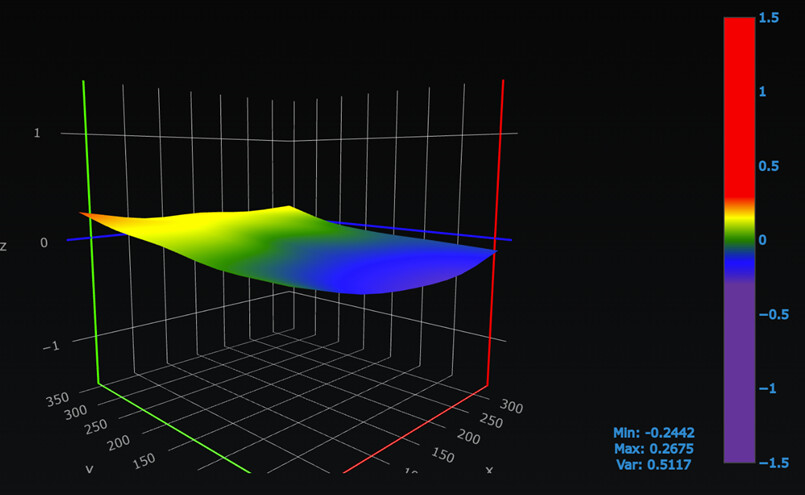
on a happier note the auto 11x11 calibration made a positive and large difference, still some issues with the first layer i am trying to run down (like why is it now translucent rather than matt dark black) and (why does 0.2mm layer height result in layer than is actually between 0.35 and 0.45 high)
tl;dr i know y’all think i am mad, i still believe calibration still to be fundamentally broken in some way (in either creation or usage of mesh data)
tomorrow i will print out the dial mount attachment finally and measure calibration points (does anyone have full set of XY coords for 5x5 ?)
If the bed is over 100°C then the difference might be greater, though probably not by much. When I get a chance, I plan on running the same tests, but more extensively across the entire build plate. The next time someone tells you that a heated bed makes a difference, you can give them the link to that video. Any absolute variance <= 0.10m (+/-0.05mm) is within the normal range of error for these printers.
if that’s true it is never echoed on the serial controller i am monitoring…
also all i will say is the issue i logged on github i couldn’t repro using gcode movement - only touchscreen movement… for example if i issued G90 \ G1 Z 334 - no issues. but maybe that’s my bad assumption?
There are 2 serial interfaces into the controller. One for the screen, one for the computer. They are not mirrored.
I think you’ve definitely found a bug, but it’s not clear to me what. Could be a freertos bug where the gcode is transferred from the hmi task over to Marlin?
I note that I0 J0 is X23 / Y18
I note that I10 J10 is X293 / 318
In real G29 one can set the bed offsets so it measures closer to the edge, any way to do that without modifying code (i couldn’t see anyway looking through the code)?
I would like
I0 J0 to be X-7/ Y-10 (actually i would like it to be Y-15 as that would still place sensor over the bed
I10 J10 to be X308 / Y323
(my perhaps faulty assumption is this would improve measurement around the edge where my issues really appear to be))
Misread the question here, no, I don’t think there’s anything to tell the bed level to move to the actual corners, without the sensor mod, the side of the toolhead can never go off the side of the bed, so the points are probably laid out to ensure that doesn’t happen on the right side (and hence mirrored to the left), but that’s totally a guess for the “why”, so take it with a grain of salt.
makes sense when we are talking about the tool head, but not for the sensor which is up to ~15mm from the edge on some edge measurements, i assume they did ‘safety margins’ for the sensor (the back Y tolerance is better, VERY close to the edge back there). given how much better an 11x11 mesh was than the 5x5 i am starting to think this machine needs a mesh with lots of points and that maps closer to the edge to be accurate. I was looking at either the UBL or ABL native marlin code - i note they have options to calculate the mesh beyond the edge points - i see nothing like that in the snapmaker versions as far as i can see.
tl;dr its likely because i ‘use relative z offsets’ in the plugin config (which is the default IIRC)
Well i adjusted the scale in octoprint - but it always shows Z=0 as once the point is set via G1029 or touchscreen calibration z=0, thats the way the octoprint plugin works and snapmaker works - z always = 0 on the touchscreen too… unless you have done something ‘interesting’
The M420V data on mine is no different to yours.
Recv:   M420 S1 Z0.00
Recv:   G29 W I0 J0 Z6.23000
Recv:   G29 W I1 J0 Z6.18000
Recv:   G29 W I2 J0 Z6.16250
Recv:   G29 W I3 J0 Z6.14000
Recv:   G29 W I4 J0 Z6.14000